IP Subnetting Made Easy – A Novice’s Guide

If you have ever opened a networking textbook, and run into a wall of binary math on the first page about subnetting, you are not alone. IP subnetting is the networking topic that scares the bejeebies out of beginners. But it’s really pretty simple once someone explains it in plain English rather than pure math. This guide will take you step by step, and with a real world example, so you can calculate subnets with confidence for your CCNA studies or your first office network.
What is IP Subnet?
IP subnetting is the technique of dividing a large network into smaller, more manageable sub-networks called subnets. Instead of having all devices on one flat network, subnetting lets you carve up that address space into logical chunks – one for each department, floor or purpose.
Picture a company building with an open floor plan, and then the same building with private offices. Both are the same size in terms of people but breaking it down into rooms makes it much easier to manage where people go, control traffic and keep things organised. That’s precisely what subnetting does for a network.
The significance of IP subnetting in networking

Without subnetting, every device on a network is part of one big broadcast domain. As the number of devices on the network grows, this quickly becomes slow, messy, and insecure. Subnetting solves this by:
- Reduce network congestion by limiting broadcast traffic to smaller groups
- Improve security by isolating departments or types of devices from each other
- More efficient allocation of IP addresses and less waste of large address blocks
- Being able to localize problems to a particular subnet to aid troubleshooting
This is one of the primary reasons why IP subnetting is one of the first practical skills tested in CCNA and other networking certifications – nearly all real-world network design decisions are based on it.
Key terms you should know before
There are some terms that come up over and over here, so it is helpful to define them clearly before we get into the steps:
- IP Address: A unique number assigned to each device connected to a computer network (e.g. 192.168.1.10)
- Subnet Mask: A number that divides the network part from the host part of an IP address (e.g. 255.255.255.0)
- CIDR Notation: A short form of a subnet mask, written as a slash followed by a number (e.g., /24)
- Network ID: Address that identifies the subnet, not a particular host
- Broadcast Address: This is the address used to send data to all devices on that subnet at once
- Host: Any device, such as a computer or printer, that has been assigned an IP address on the subnet
How to Subnet IP Addresses (Step by Step)
Here’s the real deal broken into five manageable steps.
Step 1 — Know the IP Address Structure
IPv4 address is 32 bits long, split into four groups known as octets (e.g. 192.168.1.10). Each octet can be from 0 to 255. An IP address is divided into two parts: the network part, which identifies the general network, and the host part, which identifies the particular device.
Step 2 — Find the Subnet Mask
The subnet mask tells you exactly where the network part ends and the host part begins. For example, a subnet mask of 255.255.255.0 (or /24 in CIDR notation) means that the first three octets are used for the network and the last octet is used for host addresses. This is the one number that the whole of every netting calculation is based on.
Step 3 — Determine the Number of Subnets and Hosts
Knowing the subnet mask, you can determine how many subnets and usable host addresses the subnet mask creates. The general formulas are
- Number of subnets = 2^ (borrowed bits)
- Usable hosts per subnet = 2^(remaining host bits) – 2
The “minus 2” is because of the network ID and the broadcast address which cannot be assigned to actual devices. This is where the bulk of the math anxiety actually happens. When you memorize the formula, it becomes rote.
Step 4: Locate the Subnet Ranges
Once you have worked out the number of subnets, you then need to work out the range of each subnet. This includes the network ID of the subnet, the usable IP range of the subnet, and the broadcast address of the subnet. It is this part of the process that makes the math practical to assign to devices in reality.
Step 5. Assign IPs to Devices
Then you assign individual IP addresses from the usable range of each subnet to devices, servers or interfaces, keeping the network ID and broadcast address free. This is where the entire subnetting process becomes a real working network design.
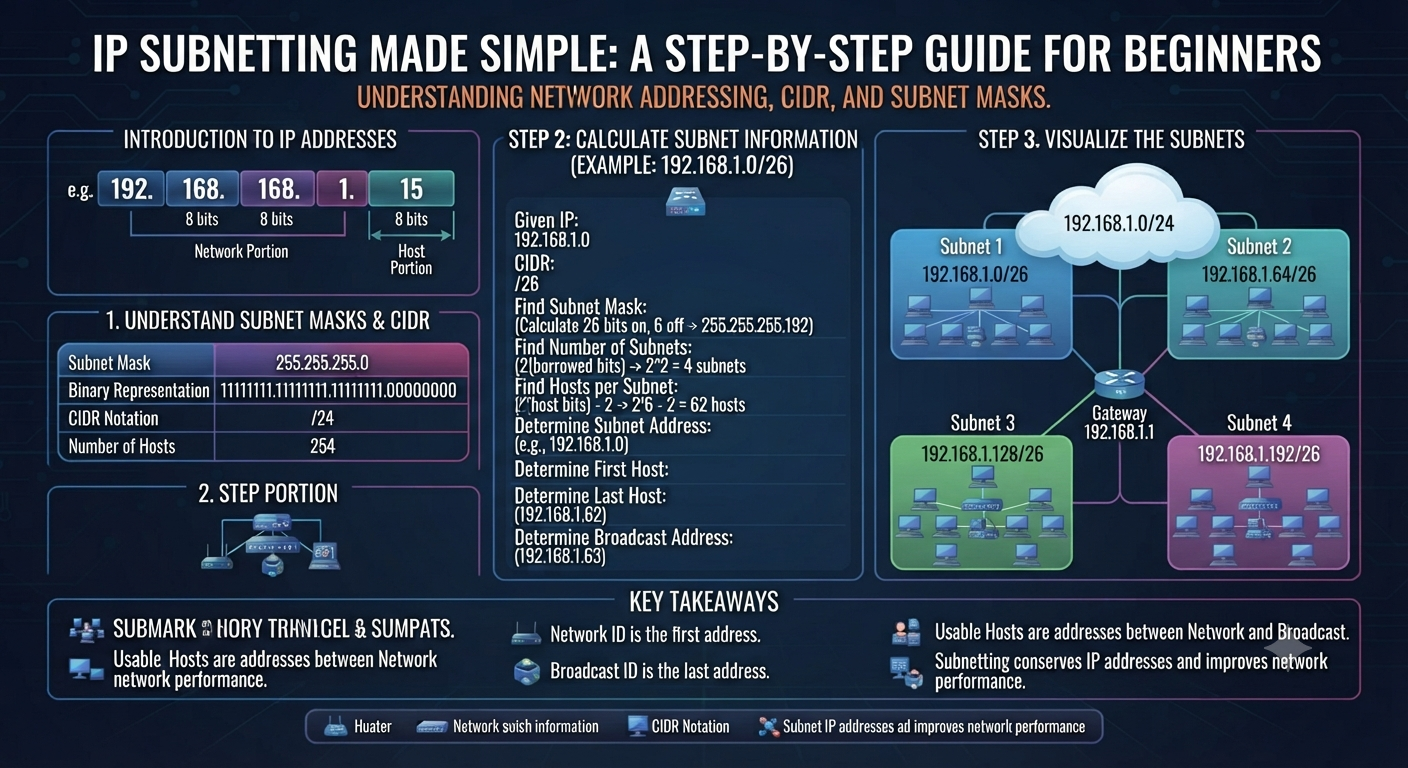
Example Walkthrough of IP Subnetting

Let’s walk through a simple real example.
Imagine you have the network 192.168.1.0/24 and want to cut it into 4 smaller subnets.
- A /24 network has 8 host bits (32-24=8). To make 4 subnets you need to borrow 2 bits (2^2 = 4 subnets), so the mask changes from /24 to /26.
- Your new subnet mask is 255.255.255.192. This gives you 4 subnets with 64 addresses ( 2^6 = 64 ) each.
- Each subnet has 62 usable host addresses (2 are reserved for the network ID and broadcast address).
- The four resulting subnets are:
- 192.168.1.0/26 (usable range .1 to .62)
- 192.168.1.64/26 (Usable range .65 – .126)
- 192.168.1.128/26 (usable range: .129 to .191)
- 192.168.1.192/26 (usable range .193 through .254)
That’s the whole process in action — one network address turned into four independent, organized subnets, each of which can hold 62 devices.
Top Mistakes to Avoid in IP Subnetting
When learning this skill, beginners tend to make the same handful of errors:
- forgetting to subtract 2 hosts for network ID and broadcast address
- Mixing up subnet mask and default gateway – they are two totally different things
- Miscoding borrowed bits, affecting all subsequent calculations
- IP conflicts across the network due to overlapping subnet ranges
- Not building for future growth and having to rework later as more devices are added
If you go slowly and check each step twice, you’ll make almost none of these errors.
CIDR Notation and Subnetting
CIDR (Classless Inter-Domain Routing) notation is the shorthand that is commonly used today in conjunction with IP subnetting. It replaces the older class-based system (Class A, B, C). CIDR does not write the entire subnet mask out. Instead, it simply states the number of network bits after a slash, such as /24 or /26. Almost every modern router, firewall and cloud platform (AWS, Azure) use CIDR notation, so it’s just as important to understand as the subnetting process itself.
Practice makes it click
IP subnetting is a skill that is learned through repetition, not memorization. If you work through some subnetting problems on paper, check your work with a subnet calculator and practice on real routers in a lab environment, it will make the concept click way faster than just reading. The math itself never changes. Most people who struggle with subnetting simply haven’t done enough repetitions yet.
Pentest Craft – Subnetting Mastery
IP subnetting is a core building block in our CCNA and CCNP Networking courses at Pentest Craft. You’ll work through subnetting on paper, but also on real Cisco equipment and simulated labs. Our instructors teach subnetting just like the guide does, step by step, using real examples, until it becomes second nature. If you’re studying for a networking cert, or want to develop real infrastructure skills, this is the kind of hands-on training that will get you there.
Common Questions about IP Subnetting
1. IP subnetting – simple definition
IP subnetting: The division of a large network into smaller, more manageable sub-networks. It facilitates address assignment, security and traffic handling.
2. Why do we need subnetting and not just one large network?
A single large network generates excessive broadcast traffic and is more difficult to secure. Subnetting splits it into smaller, isolated segments that are faster and easier to manage.
3. Subnet mask vs. CIDR notation.
They are the same information, just expressed in two different ways. A subnet mask is written out longhand (255.255.255.0) while CIDR notation is written as a shortened slash number (/24).
4. How do you find out the number of hosts available in a subnet?
Formula: 2^(host bits) – 2
The 2 is for the network ID and broadcast address that cannot be assigned to devices.
5. Is subnetting still necessary with IPv6?
Subnetting concepts still apply in IPv6, yes, but the address space is much larger and the calculations are a bit different than IPv4.
6. Do I need to learn subnetting for CCNA?
Yes, IP subnetting is one of the most heavily tested topics on the CCNA exam and you need to be able to calculate subnets quickly and accurately in order to pass.
Summary
IP subnetting can be intimidating at first, but it is really just a repeatable five-step process: understand the IP structure, identify the subnet mask, calculate subnets and hosts, find the ranges, and assign addresses. Once you see a few real world examples like the one above the math is routine rather than intimidating. If you’re looking to move beyond theory and start subnetting on real network gear, then Pentest Craft’s Networking and CCNA courses are designed to get you there, with hands-on guided training.