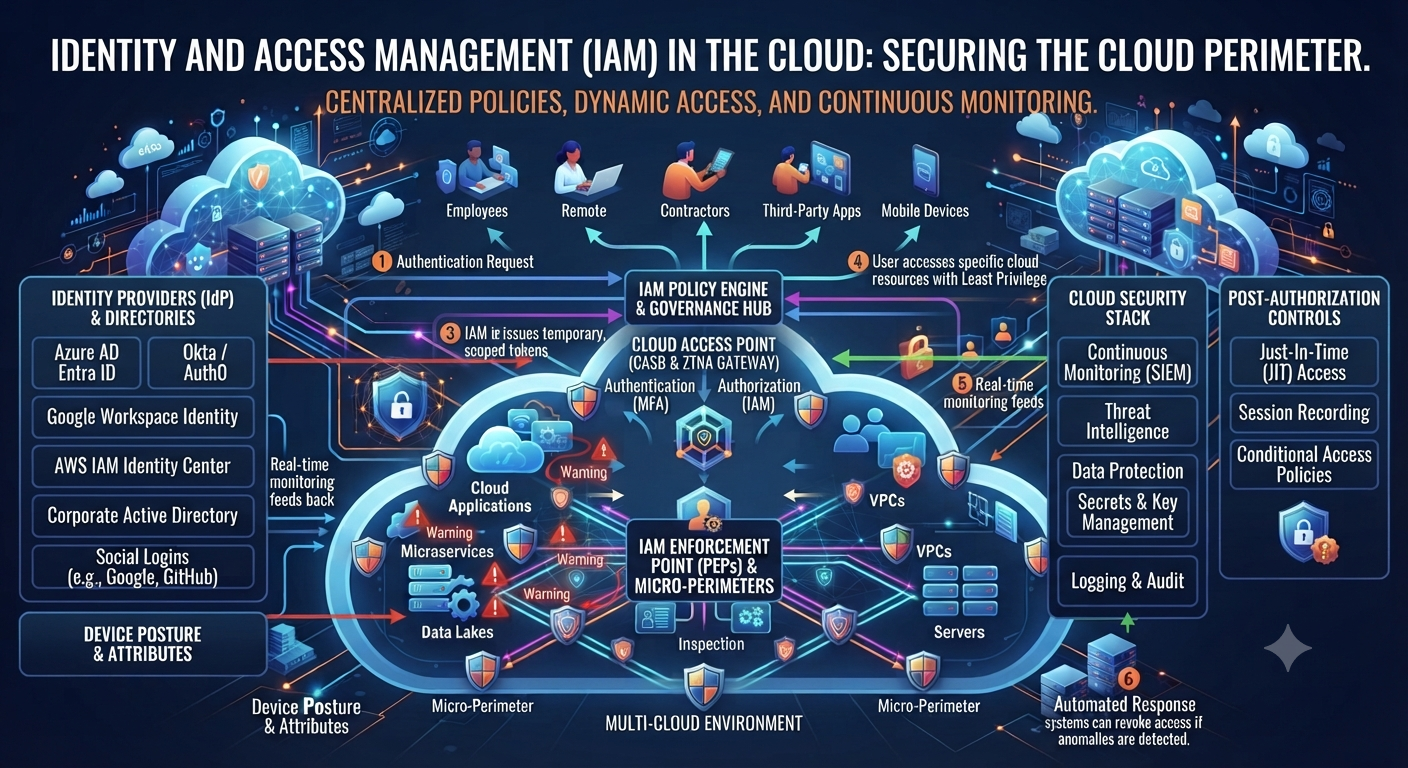
Cloud Identity and Access Management: Securing Human and Non-Human Identities Image: Digital cloud with identity icons, representing both human and non-human accounts in the cloud. The cloud security conversation for years was about employees: who has the password, who forgot to log out, who clicked the phishing link. That world is over. Most of the “identities” logging into your cloud environment today aren’t people. They are service accounts, APIs, containers, AI agents, and there are many more of them than there are humans on your payroll. And that’s precisely why Identity and Access Management has become the most critical layer of cloud security. In this guide we’ll unpack what this framework actually means, why non-human identities have become such a massive blind spot, and the practical steps you can take to secure both sides of the equation. What Is Identity and Access Management? What is Identity and Access Management (IAM)? Identity and Access Management, also known as IAM, is the collection of policies and technology that controls who or what can access your cloud resources and what they can do with them. Every time you log in, make an API call, run an automated script against your cloud environment, you’re passing through some version of this framework whether you realize it or not. At the core of this discipline is the answering of two questions for each and every request: who are you and what are you allowed to do? Get either of them wrong and you’ve opened a door that should never have been opened. Why Identity and Access Management is More Important Than Ever The cloud used to be relatively easy to secure because there were fewer moving parts. That is no longer the case and IAM strategy has had to evolve quickly to keep up. Explosion of machine identities. Most cloud environments today have many more service accounts, APIs and automated workflows than human users. AI agents are a whole new category. These systems usually need broad access to do their job and, thus, are an attractive target if left unmanaged. Remote and hybrid work eliminated the perimeter. As people log in from personal devices, home networks and shared spaces, identity has become the real security boundary. Multi-cloud creates a lot more complexity. Trying to manage a consistent access policy across AWS, Azure and Google Cloud at the same time is actually hard without a strong Identity and Access Management strategy. Credential theft is still the primary attack vector. “Once they have stolen or leaked credentials, they can walk through the front door. That’s exactly what strong identity controls are designed to prevent.” Human vs Non-Human Identities: What’s the Difference? Most people think of identity only as employees logging in. The truth is that modern Identity and Access Management has two very different categories to consider. Human Identity These are your employees, contractors and partners. They log in with user names and passwords and more and more with multi-factor authentication. Needs for access are usually fairly predictable and related to a particular role or department. Non-Human Identifiers These include service accounts, API keys, bots, containers, microservices, and even AI agents. Unlike humans, these identities often run continuously, operate at machine speed and have standing privileges that are never reviewed. Most organizations now have far more machine identities than human employees and that gap is growing every year. The problem is that many security teams still build their Identity and Access Management strategy around humans first, leaving non-human identities under-monitored and over-privileged. Cloud Identity Security Core Principles Whether the identities are human or non-human, there are a few foundational principles that are the basis of a strong identity governance program. Minimum Privilege Access Every identity, machine or human, should have the least amount of access necessary to do its job. Nothing else. Continuous Validation Access must never be a one-off check. It’s important to continuously check sessions and permissions for things like non-human identities that are operating 24/7. Scalable Identity Governance Every identity, whether it’s an employee or an automated script, should be tracked in one system, not in different tools. Top Level Authentication This principle uses multi-factor authentication for people, and short-lived, automatically rotated credentials for machines. Perform Periodic Access Reviews Permissions drift over time . Regular reviews of accounts will catch those with more access than they should have, human or otherwise. How to Implement Identity and Access Management in Cloud: 2 step by step A robust access control strategy can be put in place in time. Break it down into doable, clear steps. Step 1: Make a List of All Identities Begin with a catalog of all human users and all non-human identities in your cloud environment, including forgotten service accounts and orphaned API keys. Step 2: Enforce least privilege everywhere Check each identity and remove any excess permissions. Just this alone takes a big chunk out of your attack surface. Step 3: Bring identity management in-house Manage permissions from a single Identity and Access Management platform instead of managing permissions separately for AWS, Azure, and Google Cloud. Step 4: Implement Strong Authentication Require multi-factor authentication for all human users, and use short-lived, automatically rotated credentials for machine identities instead of static API keys. Step 5: Watch out for Non-Human Identities Treat service accounts and AI agents the same way you would treat human users. Watch what they do, notice anything strange, and lay down the law about what they can and cannot get into. Step 6: Automate Access Reviews Manual reviews can’t keep up with the speed of change in cloud environments. Automated tools can constantly flag excessive permissions and inactive accounts. Step 7: Configure Access Expiration Temporary access should really expire. One of the biggest risks in any identity governance program is one-time standing privileges that are never revisited. Step 8: Develop Your Team Even the best access management tools are worthless if the employees don’t understand the importance of access controls and how to comply. Identity & Access Management Risks