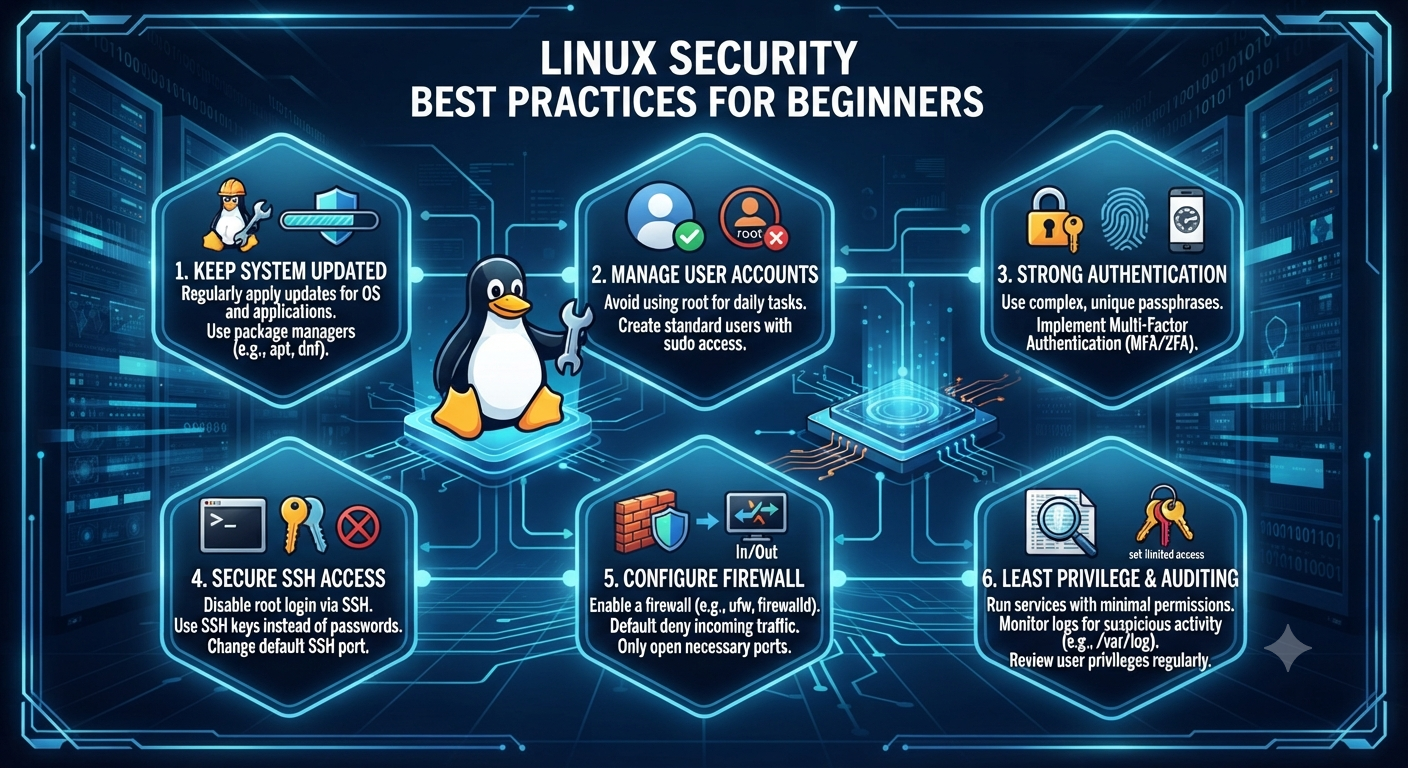
Linux Security Best Practices: Complete Guide to Hardening for Newbies

Linux powers a significant portion of the world’s digital infrastructure. It runs everything from personal computers and software development workstations to enterprise databases, cloud servers, web hosting platforms, and containerized applications. Its stability, flexibility, and open-source nature have made Linux one of the most trusted operating systems for individuals and organizations alike.
Although Linux is widely recognized for its strong security model, it is important to understand that no operating system is completely secure by default. Most Linux distributions are designed with usability and compatibility in mind, allowing users to install applications and services with minimal effort. However, these default configurations may not provide the highest level of protection against modern cyber threats.
If you’re new to Linux security, the number of security tools, commands, and configurations may seem overwhelming. Fortunately, becoming proficient at Linux hardening doesn’t require years of experience. By following a structured approach and implementing proven security best practices, you can significantly reduce vulnerabilities, minimize your attack surface, and build a more resilient Linux environment.
This guide covers some of the most essential Linux hardening practices that every beginner should implement.
1. Update your system
The simplest and most effective security habit is to keep software updated. Software bugs are regularly discovered, and vendors promptly issue patches to address them. If you don’t update, you leave known vulnerabilities open to malicious actors scanning the internet for easy pickings.
Many cyberattacks succeed simply because organizations continue running outdated software with publicly known vulnerabilities. Attackers constantly scan internet-connected systems looking for servers that have not installed the latest security patches. Keeping your operating system updated is therefore one of the easiest ways to prevent compromise.
Package Management
Run commands on Debian/Ubuntu based systems to update software packages and refresh repositories:
sudo apt update && sudo apt upgrade -yFor Red Hat-based distributions such as CentOS, Rocky Linux, AlmaLinux, or Fedora, you can use:
sudo dnf update -yor
sudo yum update -yKernel Patches
The operating system kernel often has some critical security vulnerabilities hidden in it. If you need high availability, look into live-patching solutions or make sure your system kernel is regularly upgraded.
A scheduled maintenance routine that includes kernel updates ensures your system remains protected against newly discovered exploits while maintaining long-term stability.
2. Principle of Least Privilege and Master User Account Management
The Principle of Least Privilege is one of the key tenets of computer security. It states that users and processes should be granted the minimum permissions necessary to perform their designated functions.
This principle limits the damage that can occur if an account becomes compromised. When users only have the permissions they require, attackers have fewer opportunities to move laterally through the system or gain administrative control.
Do not use the root account for daily use
The root account must never be used for regular scripts, browsing and everyday work. Instead, create a standard user account and use sudo (Superuser DO) only when you absolutely need to perform administrative actions.
Using sudo creates accountability because administrative commands are logged, making it easier to audit system activity later.
Periodically check the existing user accounts on your system. Look at /etc/passwd. Delete any inactive accounts, service users who are no longer active or any remaining test profiles.
It is also good practice to review group memberships regularly to ensure users have only the permissions required for their current responsibilities.
3. Implement robust authentication and password policies
Brute-force attacks are meant to exploit credentials that are weak and easily guessed. You protect yourself from automated script-based hacks by setting tight standards of access at your entry points.
Weak passwords remain one of the leading causes of unauthorized access. Attackers often use automated password dictionaries capable of attempting thousands of login combinations every minute.
Complexity Standards
Passwords must be 12 characters or longer and contain a good mix of uppercase and lowercase letters, numbers, and special symbols.
Instead of using simple words or predictable sequences, users should consider long passphrases that are easier to remember but much harder to crack.
Examples include combinations of unrelated words with numbers and symbols inserted naturally.
Use Multi-Factor Authentication (MFA)
Whenever you can, use MFA or Pluggable Authentication Modules (PAM) to add an extra layer of security on top of standard text passwords.
Even if an attacker manages to steal a password, MFA greatly reduces the likelihood of unauthorized access by requiring an additional verification method such as a mobile authentication application or hardware security key.
4. Secure Shell (SSH) Access

SSH is the first port of call for anyone who is tasked with managing a remote Linux server. Unfortunately, it also happens to be a prime target for malicious scanners looking for misconfigured services.
Internet-connected servers receive thousands of automated SSH login attempts every day. Proper SSH hardening dramatically reduces the likelihood of successful attacks.
Turn off SSH root login
Turn off SSH root login, so an attacker can’t log in to the highest-privileged account directly from the network.
Edit the SSH configuration file (/etc/ssh/sshd_config), and change the following:
PermitRootLogin noThis forces attackers to compromise a standard user account before attempting privilege escalation.
Transition to SSH key pairs
This includes Ed25519 or 2048 bit RSA keys.
Cryptographic key pairs are much better than old style passwords.
After you’ve successfully deployed and tested your SSH keys, disable password-based authentication entirely.
SSH keys are resistant to brute-force attacks because authentication depends on cryptographic algorithms rather than human-generated passwords.
Change the Default Ports and Use Fail2ban
It’s a good idea to change the default SSH port (port 22) to minimize the amount of log spam produced by automated botnets.
The installation of tools such as Fail2ban can also be effective in automatically blocking IP addresses that show malicious brute-force behavior.
Fail2ban continuously monitors authentication logs and temporarily blocks suspicious IP addresses after repeated failed login attempts, providing another important layer of defense.
5. Set up a strict firewall policy
A firewall is like a digital bouncer for your system, letting network traffic in and out and deciding to allow or block based on a set of rules.
Firewalls are one of the most important components of network security because they prevent unauthorized traffic from reaching services that should not be publicly accessible.
Default Deny Strategy
Set up your firewall to reject all incoming traffic by default, and only permit certain ports and services that you need (e.g. HTTP/HTTPS or SSH).
This “default deny” approach follows the principle of allowing only explicitly authorized communications while blocking everything else.
Use Native Tools
Tools like ufw (Uncomplicated Firewall) on Ubuntu or firewalld on Red Hat-based systems provide user-friendly interfaces to manage complex iptables rules without needing in-depth networking infrastructure knowledge.
Regularly reviewing firewall rules ensures that unnecessary ports do not remain exposed after software installations or configuration changes.
6. Reduce the Attack Surface by Removing Unnecessary Services
Over time, servers accumulate background services, applications, and open network ports that are no longer needed. Each active service represents a possible way to compromise.
Every running process consumes system resources and potentially introduces new vulnerabilities. Minimizing installed software is one of the most effective hardening techniques.
Audit Listening Ports
Use diagnostic tools to find out what applications are listening for network connections.
sudo ss -tulpnReview the output carefully and verify that every listening service has a legitimate business or operational purpose.
Disable Unnecessary Daemons
Uninstall and disable any services you do not actively use (like an old FTP server, Telnet, or unused web service).
Legacy protocols such as Telnet and FTP transmit sensitive information without encryption and should be replaced with modern secure alternatives like SSH and SFTP whenever possible.
Conducting periodic service audits helps ensure your Linux system remains clean, efficient, and secure.
7. Use of Mandatory Access Control (MAC)
Basic security is provided by normal Linux file permissions (read, write, execute for user, group, and others), but advanced environments may want to use Mandatory Access Control frameworks like SELinux (Security-Enhanced Linux) or AppArmor.
These frameworks enforce granular security policies that restrict what even a process of root level can do, thus reducing the potential for breaches dramatically.
Unlike traditional Linux permissions, MAC policies continue enforcing restrictions even after an attacker gains elevated privileges. This containment significantly limits the damage caused by exploited applications or compromised services.
While configuring SELinux or AppArmor may initially appear complex, learning their fundamentals provides long-term security benefits for both personal systems and enterprise environments.

To conclude
Linux security isn’t a checkbox you check and forget about. It’s an ongoing operational practice. You build a resilient foundation by following strict access controls, having operational visibility, hardening your SSH configuration and having up-to-date software.
No single security measure can guarantee complete protection. Instead, Linux hardening relies on multiple defensive layers working together to reduce risk. Regular updates, strong authentication, secure remote access, firewall configuration, service management, and access control policies collectively create a significantly more secure operating environment.
As your Linux knowledge grows, you can gradually explore more advanced security topics such as intrusion detection systems (IDS), endpoint monitoring, centralized logging, file integrity monitoring, vulnerability scanning, container security, and security automation. These advanced practices build upon the fundamentals discussed in this guide and further strengthen your overall security posture.
Start with small, incremental implementation of these best practices to gradually build a security-first mindset in your Linux environment. Consistency is more important than complexity. Even implementing a handful of these recommendations can substantially improve the security of your Linux system and prepare you for more advanced hardening techniques in the future.