Advance Cloude Security

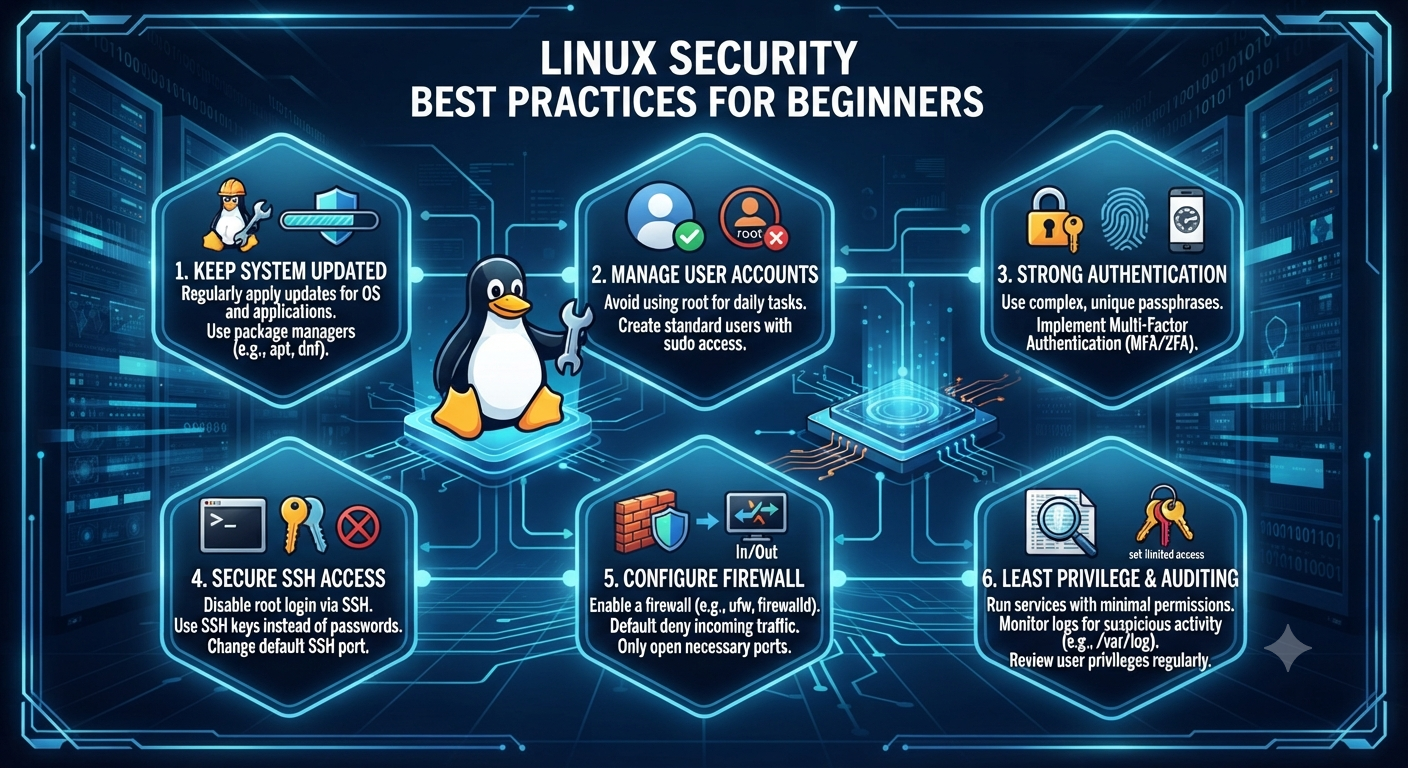
Linux Security Best Practices for Beginners

Linux Security Best Practices: Complete Guide to Hardening for Newbies Linux powers a significant portion of the world’s digital infrastructure. It runs everything from personal computers and software development workstations to enterprise databases, cloud servers, web hosting platforms, and containerized applications. Its stability, flexibility, and open-source nature have made Linux one of the most trusted operating systems for individuals and organizations alike. Although Linux is widely recognized for its strong security model, it is important to understand that no operating system is completely secure by default. Most Linux distributions are designed with usability and compatibility in mind, allowing users to install applications and services with minimal effort. However, these default configurations may not provide the highest level of protection against modern cyber threats. If you’re new to Linux security, the number of security tools, commands, and configurations may seem overwhelming. Fortunately, becoming proficient at Linux hardening doesn’t require years of experience. By following a structured approach and implementing proven security best practices, you can significantly reduce vulnerabilities, minimize your attack surface, and build a more resilient Linux environment. This guide covers some of the most essential Linux hardening practices that every beginner should implement. 1. Update your system The simplest and most effective security habit is to keep software updated. Software bugs are regularly discovered, and vendors promptly issue patches to address them. If you don’t update, you leave known vulnerabilities open to malicious actors scanning the internet for easy pickings. Many cyberattacks succeed simply because organizations continue running outdated software with publicly known vulnerabilities. Attackers constantly scan internet-connected systems looking for servers that have not installed the latest security patches. Keeping your operating system updated is therefore one of the easiest ways to prevent compromise. Package Management Run commands on Debian/Ubuntu based systems to update software packages and refresh repositories: sudo apt update && sudo apt upgrade -y For Red Hat-based distributions such as CentOS, Rocky Linux, AlmaLinux, or Fedora, you can use: sudo dnf update -y or sudo yum update -y Kernel Patches The operating system kernel often has some critical security vulnerabilities hidden in it. If you need high availability, look into live-patching solutions or make sure your system kernel is regularly upgraded. A scheduled maintenance routine that includes kernel updates ensures your system remains protected against newly discovered exploits while maintaining long-term stability. 2. Principle of Least Privilege and Master User Account Management The Principle of Least Privilege is one of the key tenets of computer security. It states that users and processes should be granted the minimum permissions necessary to perform their designated functions. This principle limits the damage that can occur if an account becomes compromised. When users only have the permissions they require, attackers have fewer opportunities to move laterally through the system or gain administrative control. Do not use the root account for daily use The root account must never be used for regular scripts, browsing and everyday work. Instead, create a standard user account and use sudo (Superuser DO) only when you absolutely need to perform administrative actions. Using sudo creates accountability because administrative commands are logged, making it easier to audit system activity later. Periodically check the existing user accounts on your system. Look at /etc/passwd. Delete any inactive accounts, service users who are no longer active or any remaining test profiles. It is also good practice to review group memberships regularly to ensure users have only the permissions required for their current responsibilities. 3. Implement robust authentication and password policies Brute-force attacks are meant to exploit credentials that are weak and easily guessed. You protect yourself from automated script-based hacks by setting tight standards of access at your entry points. Weak passwords remain one of the leading causes of unauthorized access. Attackers often use automated password dictionaries capable of attempting thousands of login combinations every minute. Complexity Standards Passwords must be 12 characters or longer and contain a good mix of uppercase and lowercase letters, numbers, and special symbols. Instead of using simple words or predictable sequences, users should consider long passphrases that are easier to remember but much harder to crack. Examples include combinations of unrelated words with numbers and symbols inserted naturally. Use Multi-Factor Authentication (MFA) Whenever you can, use MFA or Pluggable Authentication Modules (PAM) to add an extra layer of security on top of standard text passwords. Even if an attacker manages to steal a password, MFA greatly reduces the likelihood of unauthorized access by requiring an additional verification method such as a mobile authentication application or hardware security key. 4. Secure Shell (SSH) Access SSH is the first port of call for anyone who is tasked with managing a remote Linux server. Unfortunately, it also happens to be a prime target for malicious scanners looking for misconfigured services. Internet-connected servers receive thousands of automated SSH login attempts every day. Proper SSH hardening dramatically reduces the likelihood of successful attacks. Turn off SSH root login Turn off SSH root login, so an attacker can’t log in to the highest-privileged account directly from the network. Edit the SSH configuration file (/etc/ssh/sshd_config), and change the following: PermitRootLogin no This forces attackers to compromise a standard user account before attempting privilege escalation. Transition to SSH key pairs This includes Ed25519 or 2048 bit RSA keys. Cryptographic key pairs are much better than old style passwords. After you’ve successfully deployed and tested your SSH keys, disable password-based authentication entirely. SSH keys are resistant to brute-force attacks because authentication depends on cryptographic algorithms rather than human-generated passwords. Change the Default Ports and Use Fail2ban It’s a good idea to change the default SSH port (port 22) to minimize the amount of log spam produced by automated botnets. The installation of tools such as Fail2ban can also be effective in automatically blocking IP addresses that show malicious brute-force behavior. Fail2ban continuously monitors authentication logs and temporarily blocks suspicious IP addresses after repeated failed login attempts, providing another important layer of defense. 5. Set up a strict firewall policy A firewall
Advance Cloude Security

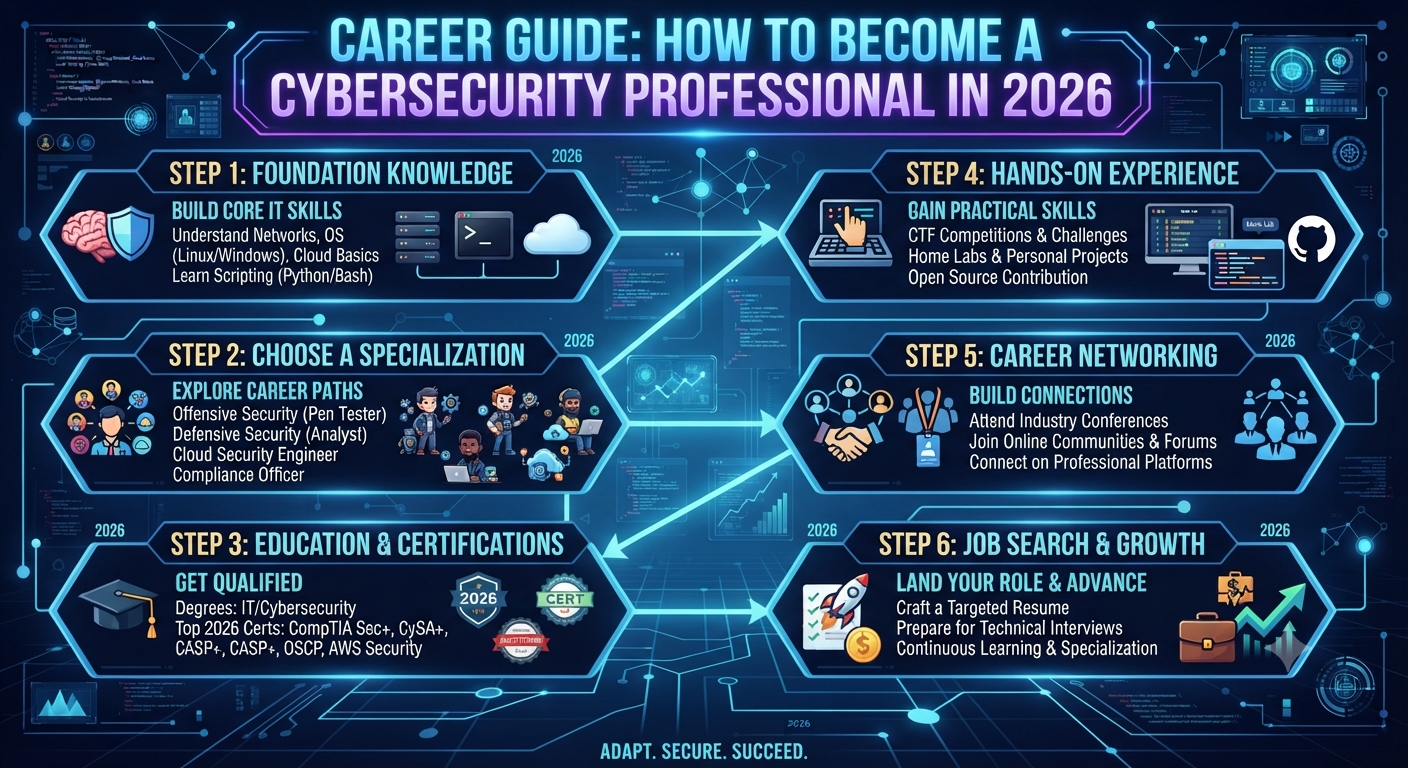
Career Guide: How to Become a Cybersecurity Professional in 2026

How to Become a Cyber Security Professional in 2026     Introduction Cybersecurity is one of the fastest growing technology industries and one of the most resilient given the world’s reliance on digital infrastructure As we approach 2026, the emergence of new technologies at a rapid pace, the increasing number of cyberattacks, and the changing nature of threats all contribute to a need for a skilled cybersecurity workforce. If you’re a student or an IT professional looking for new challenges or someone interested in a career change, a career in cybersecurity is a path of stability, opportunity and the satisfaction of protecting what matters most.This resource provides a complete overview of the strategies, skills and procedures needed to create and achieve success in a cybersecurity career. It provides a thorough overview of current trends, practical advice and tangible actions. Why is cyber security important? Organizations worldwide are facing a new level of cyber risk due to ransomware, phishing, and data breaches. This has resulted in a serious shortage of cyber security professionals. Industry estimates suggest millions of new cybersecurity jobs will need to be filled in the next several years. Top reasons to build a career in cybersecurity: Why: Cybersecurity threats are a persistent issue across all sectors and job security is a major concern. We will pay you a competitive salary and offer you attractive benefits in return for your professional skills. Career growth: There’s a very clear path from analyst to CISO in this field. Objective You’re at the forefront of safeguarding data, privacy and digital trust. Step 1: Getting to Know the Cyber Security Terrain Cyber security is a multi-dimensional topic. It’s useful to know what kind of roles are out there before you begin: Security Analyst Builds defenses, investigates incidents, maintains systems. Ethical Hacker (Penetration Tester) – Be a hacker, locate vulnerabilities before they are. Security Engineer – Designs & develops secure security systems. Incident Responder – Deals with and handles security incidents and cyber security emergencies. Security Consultant: Provides advice to organizations on compliance, risk management, and best practices. At the executive level, the CISO owns the security strategy. Different roles require different mixes of technical skills, analytical skills, and communication skills. Step 2: Create a Strong Foundation. “To succeed in the field of cybersecurity, one needs a good understanding of information technology. Specialties Networking – Knowledge of network architectures, protocols, firewalls and VPNs . Get to know the Linux and Windows operating systems. Programing: Not always needed, but learning a programing language, like Python or Bash, can be very useful for the automation and scripting of tasks. Security Fundamentals : Learn about encryption , authentication , access controls , and threat modeling . You can learn these skills at your own pace using open source labs, MOOCs and free online resources.   Step 3: Choose a RouteThere’s no one-size-fits-all approach to getting a cybersecurity career. The typical paths are following: Earn a related degree, such as information security or computer science. Self-Paced: Cybersecurity forums, blogs, YouTube tutorials, and courses. Bootcamps are immersive, hands-on programs that get you ready for a career in months, not years. Certification Industry recognized certifications are a sign of your abilities and can help you move forward (see list below). Many successful professionals use several of these methodologies and continue to learn and grow as technology progresses. Step 4: Get Certified One way to prove your skills and boost your credibility with potential employers is to get certified. These certificates are highly regarded by both beginners and seasoned professionals: CompTIA Security+ is an entry-level security certification. This is security 101. Certified Ethical Hacker (CEH) : Focuses on hacking techniques and penetration testing. Certified Information Systems Security Professional (CISSP) – This is best for professionals with considerable experience in security project management. Certified Cloud Security Professional (CCSP) and Certified Information Security Manager (CISM) Cloud security and management. Get certifications relevant to your career path and the jobs you want. Grab it. Employers want real skills, relevant skills, not pieces of paper. So here are some suggestions for practical experience: Home Labs Build virtual machines to test tools and simulate attacks in a safe setting Open Source Projects – Contribute to community and security tools. Security issues – participate in hackathons and CTFs (Capture The Flag). Internships: Seek out entry-level jobs or internships to help you build your professional network and resume. Volunteer. Work for a struggling small business or a non-profit that can’t afford to pay you. Step 6: Build Your Professional Network Cybersecurity is a very collaborative field. Networking is a great way to learn about job opportunities, emerging threats and technologies, and find mentors. LinkedIn – Join cybersecurity groups, network with cybersecurity professionals, and follow key people in the field. Attend conferences, meetups, virtual events, and local industry events. Online Communities: Join specific Slack channels, Discord servers and Reddit forums revolving around Cybersecurity. Never can the importance of a good network in one’s professional life be overstated. Step 7: Work on Your Soft Skills Technical skills are important, but the best cybersecurity professionals also possess strong soft skills. Communication: Explain complex concepts in an easy-to-understand way to those who aren’t technical. Being able to think creatively and problem solve is essential to anticipate and respond to potential hazards. Flexibility – Show that you can stay calm in a high pressure situation and be open to change. Morals. “You work on trust, and so you have to be held to the highest ethical standards. Learn, learn, learn.The world of cybersecurity is constantly evolving. What you know today may be obsolete tomorrow. Commitment to continuous learning. Subscribe to cybersecurity news and threat intelligence sources. Earn additional certifications. Take higher level classes. Explore emerging technologies such as artificial intelligence, cloud security and the Internet of Things. Step 9: Look into Career Progression and SpecializationWith experience, you could specialize in topics like compliance, red teaming (attack), blue teaming (defense), cloud security, or digital forensics. As you develop, you might find yourself in

Advance Cloude Security

Top Cybersecurity Trends to Watch in 2026

Intro: Cybersecurity Trends to Watch in 2026   The cybersecurity industry is always following the fast-changing digital world. As organizations transition to cloud-first, remote-enabled operations, the stakes have never been higher. As 2026 looms cyber criminals are using the latest technology and cyber threats are becoming more sophisticated. So what does this mean for government, business and the public? The answer is clear. It’s not an option – you must keep up with the latest cybersecurity trends. In this article, we’re going to look at the top cybersecurity trends for 2026, and share useful tips, real-world examples, and insights that can help you protect your personal data and organization in an ever-evolving threat landscape. 1. AI:   AI is changing everything in cybersecurity. On the offensive side, AI-enabled tools can analyze vast volumes of data on the fly, identify anomalies and counter threats at an unprecedented pace. Machine learning models are excellent at detecting anomalous activity on networks, new malware, and even predicting future attacks based on behavioral analysis. AI is also being targeted by cybercriminals. More attacks will be carried out using AI, including malware that changes its form to avoid detection, deepfake scams and AI-powered phishing emails. In the face of the AI arms race, the need for skilled professionals who can outsmart human adversaries and automated threats will only grow. 2. The Evolution of Double Extortion and Ransomware Ransomware attacks have evolved so much in the last decade and 2026 will not be different. The latest trend among criminals is to encrypt the data of their victims and threaten to publish it if the ransom isn’t paid, a practice known as “double extortion.” Schools, healthcare providers and critical infrastructure are frequent targets because the consequences can be catastrophic. For protection against ransomware, companies should have impenetrable backups, strong endpoint protection and ongoing employee education to recognize phishing, which is the primary way most ransomware attacks start. 3. Enforce Zero Trust Security   Traditional perimeter-based security paradigm, which assumes all nodes inside the network are trusted, is dying out fast. #1 — Zero Trust Will Become the De Facto Standard by 2026. Zero Trust assumes, by default, that no user, device or application should be trusted regardless of their location. Organizations are trending toward continuous authentication, micro-segmentation, tight access controls and real-time monitoring of user behavior. This approach mitigates the impact of a breach and limits the lateral movement of adversaries. 4. Cloud Security Complexity   As organizations deploy more cloud applications and sensitive data, the complexity of securing cloud environments is growing. Supporting hybrid and multi-cloud environments is now standard practice, so you need security policies and visibility across AWS, Azure, Google Cloud and private clouds. Misconfigurations remain the number one cause of cloud breaches, with data leaks via public storage buckets and over-permissions still the most common. Expect automated configuration checks, Cloud Security Posture Management (CSPM) tools and “shift-left” security — embedding security early in the development lifecycle — to become commonplace in 2026. 5. Rise of Supply Chain Attacks   Consequently, cybercriminals are increasingly exploiting vulnerabilities in third-party software, hardware and service providers. “The Kaseya and SolarWinds attacks both show how the compromise of a single vendor can impact thousands of downstream organizations. To mitigate the risk, organizations are demanding transparency and tracking software updates for suspicious patterns and performing detailed vendor assessments to mitigate the risk. 6. Data Sovereignty and Privacy Legislation High-profile data breaches have been widely publicized and governments around the world are implementing stricter privacy laws. By 2026, it is expected that more countries will adopt GDPR-like regulations, which include data protection, breach notification, and data sovereignty (i.e., keeping data within certain geographical boundaries). Compliance is more than a checkbox; it is a competitive advantage. By implementing privacy by design, organizations can build trust with their customers and avoid costly penalties. 7. Scaled Security for the Internet of Things (IoT) The proliferation of IoT devices, including industrial sensors, medical devices and smart home gadgets have opened up a vast attack surface. By 2026, billions of connected devices will be online. A significant number of them will lack even basic security controls. We expect an increase in assaults on susceptible IoT endpoints either to initiate Distributed Denial-of-Service (DDoS) attacks or to access network infrastructure that is significantly larger. Organizations will need to segment IoT devices and continuously monitor them. Manufacturers will face more pressure to adopt security standards. 8. Biometric Authentication and No Password   But passwords remain susceptible to human error from phishing and credential stuffing attacks. Passwordless Authentication: By 2026, more organizations will adopt passwordless authentication, using biometrics (fingerprint or facial recognition), security keys, and mobile push notifications. Biometric authentication can reduce risk and friction, but also raises new privacy concerns and attack vectors. “It will be important to have a multi-layer approach that combines biometrics with other factors. 9. Security orchestration and automation (SOA) The need for automation is driven by the ever changing nature of cyber threats and a lack of skilled security professionals. Security Orchestration, Automation and Response (SOAR) platforms can help streamline the detection, investigation and response processes. Teams can triage alerts, contain threats and remediate incidents in the moment. By 2026, automation will be used more for accomplishing routine work, leaving human analysts to focus on sophisticated threats and higher-level decision making. 10. Quantum Computing and Post-Quantum Security   Quantum computing is a revolution in the technology that can revolutionize the field of computing but can also endanger the security of many existing encryption schemes. Even though large-scale quantum attacks have not yet happened, forward-looking organizations are getting ready for a post-quantum world by evaluating their cryptographic assets and exploring quantum-resistant cryptography. “Technology is moving so fast, but you still have to be competitive in the data security space. To sum up, the cybersecurity landscape of 2026 will be characterized by the ever-evolving regulatory environment and rapid technological advancement. Both attackers and defenders will be powered by artificial intelligence. Ransomware will become more sophisticated.

Advance Cloude Security

Cloud Security Explained: Protecting Data in the Cloud

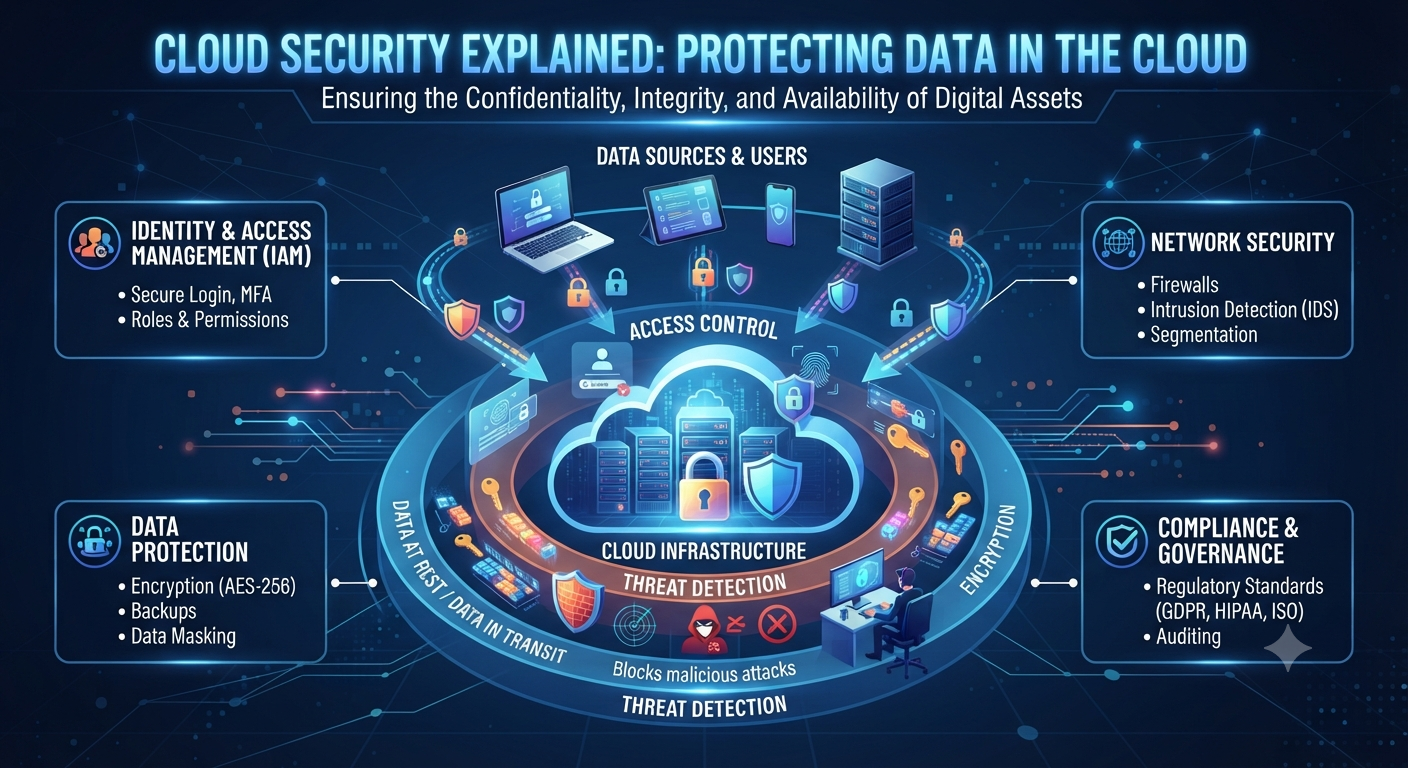
Cloud Security: The Ultimate Guide to Protecting Data in the Cloud Introduction to Cloud Security: Data Protection in the Cloud   The advent of cloud computing has revolutionized the ways in which organizations and consumers store, process, and retrieve data. Instead of buying physical servers at their offices or data centers, organizations can use cloud platforms to scale their infrastructure, run applications, store files and run databases with a couple of clicks. Its versatility has sped up the digital transformation of almost every industry, from banking to healthcare to education to e-commerce. With sensitive data moving into the cloud, protecting such data becomes increasing important. Cybercriminals are always on the lookout for vulnerabilities they can exploit to steal sensitive information, disrupt business processes or gain unauthorized access to cloud resources. One security breach, such as a weak password or misconfigured storage bucket, can result in the loss of thousands of customer records, and significant financial and reputational damage. Cloud Security is the set of technology, policies, procedures and best practices used to protect systems, applications, and data that reside in the cloud. This allows organizations to enjoy the benefits of cloud computing without compromising on availability, integrity or confidentiality. In this guide, we will delve into the fundamentals of cloud security in detail, offering practical advice and highlighting common threats to assist individuals and organizations in safeguarding their cloud environments. What Is Security of the Cloud?   Cloud security is a set of technologies and protocols that are used to secure cloud-based data, applications and infrastructure from cyber-attacks. It is a blend of technical controls, operational procedures and governance policies designed to protect business continuity and mitigate security risks. Unlike traditional IT environments, cloud security follows a shared responsibility model. The cloud service provider secures the infrastructure underneath but the customer is responsible for securing their own applications, user accounts, data and configurations. A company might, for instance, keep sensitive customer data on a cloud platform. The provider is responsible for the security of the network and physical servers that support the service. The organization is responsible, however, for making sure that sensitive data is encrypted, access privileges are appropriate, and user activity is monitored. The Significance of Cloud Security     Organizations are moving to cloud computing to save on costs and for flexibility and scalability. But these benefits also bring new security problems. What if a company doesn’t have enough security? Data leaks Burglary by unlawful entry Amount of financial loss Outage of Service Sanctions for regulatory violations Distrust the customers A good cloud security strategy helps organizations shrink their attack surface, quickly spot threats, and maintain compliance with industry regulations. What is the Shared Responsibility Model?     Knowing who is responsible for what is one of the most important aspects of cloud security. Cloud Providers’ Responsibilities The majority of cloud providers implement security protocols such as: The data center’s physical location The networking platform Hard Disk Drives Virtualization platforms Cloud services that are core Customer Responsibilities Customers are usually responsible for: User account management Identity and Access Management (IDAM) Encryption of data during OS installation Application security Surveillance security measures Disaster recovery and backup “The number one reason for cloud security incidents is the lack of clear roles and responsibilities.” Cloud Security Risks     Many cyber threats are amenable to cloud environments. Understanding those risks is the first step toward building good defenses. Loss of Data A data breach is when confidential information is accessed without authorisation. Attackers may use stolen credentials, weak passwords or misconfigured cloud storage to access sensitive data. For example: Consider an online retailer that accidentally exposes a cloud storage bucket to the public. Anyone with the right URL could see customers’ names, e-mail addresses and payment details. Cloud Resources Misconfiguration Misconfiguration is often the bane of cloud security. Some examples: Publicly accessible databases Storage buckets accessible to the public No limitations on firewall policies User rights are too lenient Even the largest of organizations have had security issues due to simple configuration mistakes. Weaknesses in Identity and Access Management (IAM) Attacker can exploit compromised accounts due to insufficient access control. Common issues: Weak Passwords Common administrator accounts Multi-factor authentication not supported Too much rights Users can be confident that they will only be granted the minimum access necessary to do their jobs. This is the least authority principle. Internal Threats External attackers don’t cause all security incidents. Employees, contractors or partners with the required access could unwittingly or maliciously disclose sensitive information. Consistent monitoring and tight access controls minimize insider threats. Ransomware and Malware     Attackers can use malware to gain control over systems connected to the cloud. Ransomware can encrypt business data and only restore access after payment. Having secure backups and endpoint protection greatly reduces the severity of ransomware attacks. Account Take Overs Credential stuffing, phishing, and password reuse are the most frequent ways cybercriminals attempt to compromise cloud accounts. Actions Taken by the Attacker on Entry: Theft of sensitive information Further assaults are launched Build hardware for crypto currency mining Delete the backups Conceal the admin accounts One of the best defenses against account hijacking is multi-factor authentication. Features of Cloud Security     “A good cloud security solution is not one product, it’s a combination of many layers of protection.” Identity and Access Mgmt (IAM) IAM provides users with the authority to access cloud resources and perform actions. The main characteristics are as follows: Username Role-based access control (RBAC) Authorization Management Multi-factor authentication (MFA) Single sign-on (SSO) Data Encryption Encryption is the process of securing data so that it cannot be read by those who do not have the correct encryption key. Organizations should implement encryption for: Data at rest Data in transit Files that are backups Databases By encrypting data, you greatly reduce the amount of data that can be exposed in a breach of a storage system. Security Network “Security controls like protection and segmentation are a must to secure cloud networks.”

Advance Cloude Security

What is Ethical Hacking? A Beginner’s Guide to White Hat Hacking

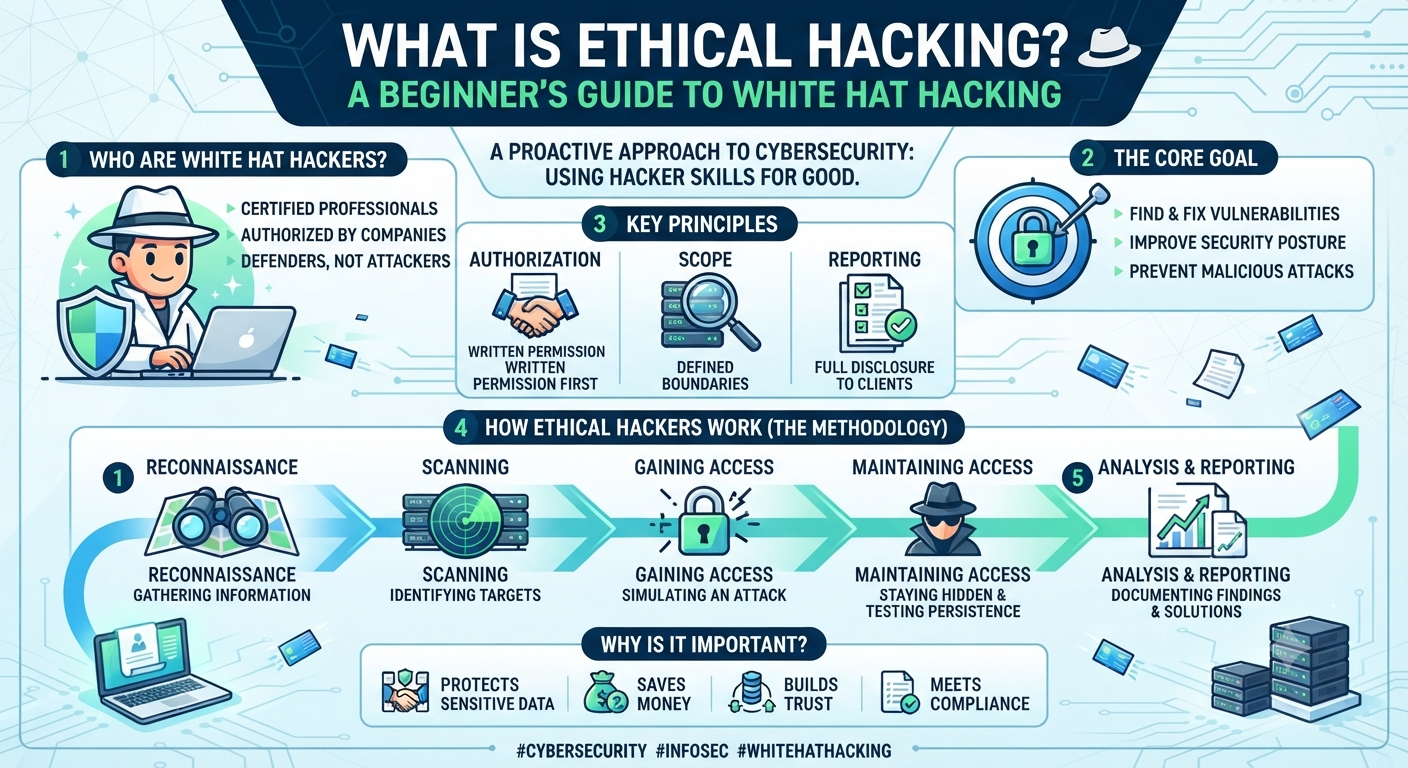
Ethical Hacking – What Is It? Introduction to White Hat Hacking   Most people when they hear the word “hacker” think of someone breaking into systems from a dark room, causing damage and disappearing into thin air. That picture is not wholly inaccurate, but it is only part of the story. The other half is ethical hacking. These are the skilled professionals who hack into systems intentionally, with permission, to find weaknesses before the criminals do. This guide covers what ethical hacking really is, how it differs from illegal hacking, what ethical hackers do day-to-day, and what it takes to get started in this field — whether you’re completely new to cybersecurity or just trying to understand the term properly for the first time. What is Ethical Hacking Actually? Ethical hacking is an authorized attempt to gain access to computer systems, networks, or applications to find potential vulnerabilities that a malicious hacker could exploit. The key word here is authorized – ethical hacking is only performed with the express permission of the owner of the system, under clearly defined rules and boundaries. Ethical hackers employ many of the same tools and techniques as criminal hackers, but the intent and legality are entirely different. While a malicious hacker breaks in to steal data, cause damage or extort a business, an ethical hacker does the same technical work to report vulnerabilities so they can be fixed. This is also why ethical hacking is sometimes called “white hat hacking.” A reference to old westerns where the good guys wore white hats and the bad guys black. Why is Ethical Hacking Necessary?   Any organization that stores data, runs a network, or operates online systems is at risk. Attackers are constantly seeking out vulnerabilities: old software, weak passwords, badly configured servers, unpatched vulnerabilities. On the defender side, ethical hacking is there to find those same vulnerabilities before someone with bad intentions does. That’s why ethical hacking has evolved from a niche IT skill to one of the most in-demand skills in the tech industry. Ethical hackers are routinely used by businesses, governments and even individual app developers to test their systems. The cost of a real breach, in terms of money, legal fall-out and reputation, is almost always greater than the cost of prevention. Ethical Hacking vs Illegal Hacking: What is the Difference? The technical skills used for ethical hacking and illegal hacking can look almost identical from the outside. And the real difference comes down to three things: permission, intent and legality. Permission – Ethical hackers have a signed agreement (usually called a scope of work or rules of engagement) that specifically gives them permission to perform testing. Illegal hackers do not have this authorization. Intent — Ethical hackers seek to discover and report weaknesses so they can be fixed. Malicious hackers want to exploit weaknesses for personal gain, disruption, or theft. Legality – Ethical hacking is 100% legal when done under a sanctioned contract. The vast majority of countries classify the same unauthorized acts as criminal offenses. This is why professional ethical hacking always starts with clear documentation, what systems can be tested, what methods are fair game, and what the reporting process looks like once testing is complete. The Different Kinds of Hackers Once you understand the broader categories hackers are usually put into, then ethical hacking is easier to understand: White Hat Hackers — Ethical hackers who are authorized to test systems to improve security. Ethical hacking is a part of this category. Black Hat Hackers – Malicious hackers who hack into systems without permission, usually to steal money, data or cause disruption. Gray Hat Hackers – In between; they might find and report vulnerabilities without specific permission, technically breaking rules but not with malicious intent. Professional ethical hackers steer clear of this legally risky middle ground. Ethical hacking as a career and discipline is firmly in the white hat camp — authorization is not optional, it’s foundational to the profession. What Is an Ethical Hacker and What Do They Do? Ethical hacking work is usually done following a process on a day to day basis, rather than just randomly poking around. Most engagements proceed through phases that look something like this: Reconnaissance – Gathering information about the target system, such as information about the domain, network structure or any publicly available information that can be useful. Scanning – Using tools to find live systems, open ports, and services running on the target network, creating a map of what’s actually accessible. Gaining Access – Trying to exploit vulnerabilities to show how the hacker can actually get into the system, but always within the limits of the authorization agreement. Maintaining Access — Testing if a simulated attacker can remain undetected within a system over time, helping organizations understand real-world persistence risks. Reporting — Documenting every vulnerability found, how it was exploited, and clear recommendations on how to fix it. This report is often the most valuable deliverable of the entire engagement – it’s what actually makes the organization more secure afterwards. This methodical approach is what separates professional ethical hacking from random experimentation. Each phase serves a purpose and the final report is what translates technical findings into real, actionable security improvements. Ethical Hackers Test Common Spaces   Ethical hacking is not just for one type of system. Ethical hackers may test the following, depending on the engagement: Networks – Searching for weak configurations, exposed services or outdated firmware. Web applications – Testing for common vulnerabilities such as injection flaws, broken authentication, and insecure data handling. Wireless networks – Testing Wi-Fi infrastructure for encryption strength and access controls Physical security — Testing in some engagements whether or not unauthorized persons could physically get into secure areas. Social engineering – Evaluating employees’ susceptibility to being tricked into revealing confidential information, often through simulated phishing attacks. It’s a range, and that is part of why the ethical hacking field rewards broad security knowledge, not a single narrow skill. Skills Required to Become

Advance Cloude Security

Linux vs Windows: Key Differences Explained for Beginners

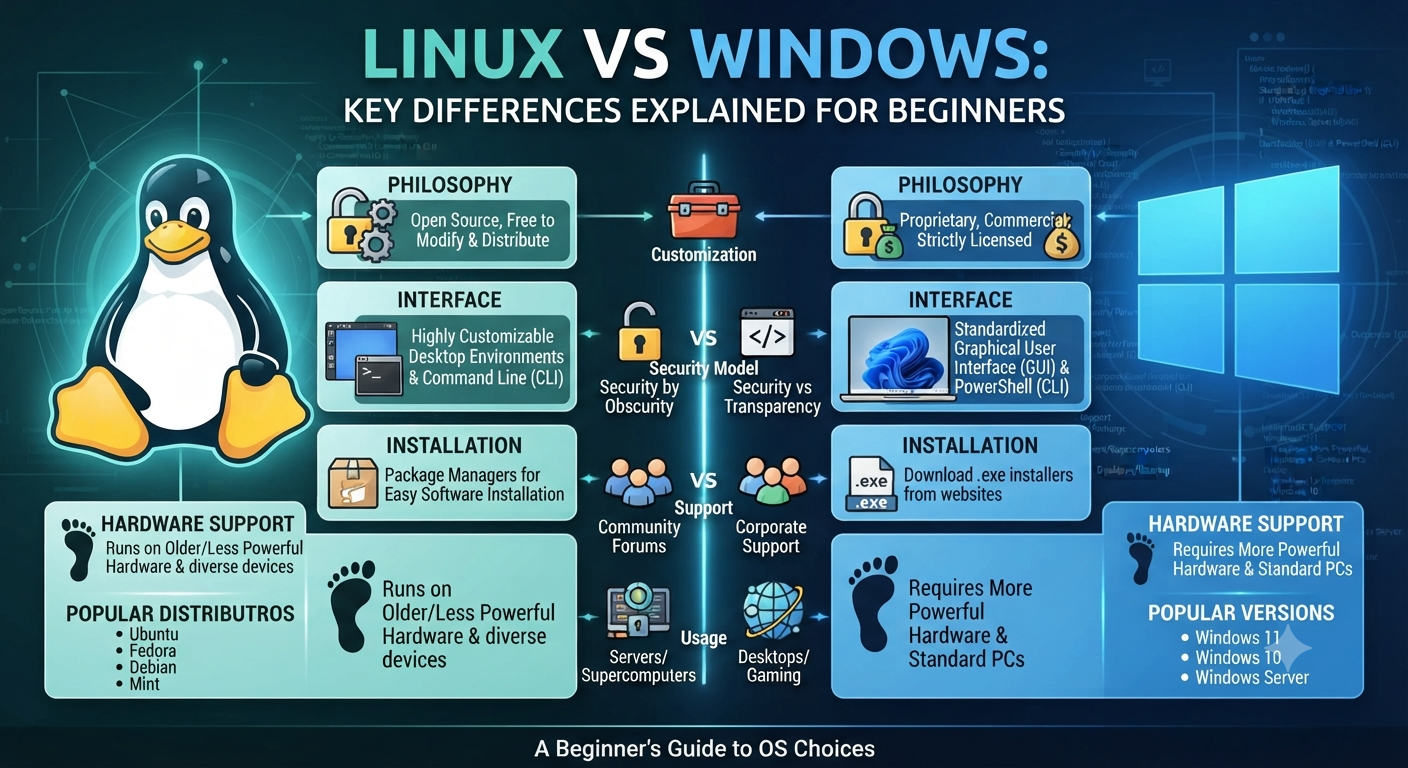
Linux vs Windows – The Differences Explained for Newbies   For those of you who have spent your whole computing life within Windows, hearing people talk about Linux can sound like they are talking about a whole different kind of tech. It is not. But the difference is real and matters if you are thinking of switching, learning IT or even just curious why so many servers, developers and security professionals prefer Linux. This guide will compare Linux and Windows in plain English. We’ll look at what each operating system actually is, compare costs, security, customization, and software support, and help you decide which one makes sense for what you want to do. What is Linux and What is Windows? But before we start a feature-by-feature comparison of Linux vs Windows, it helps to know what each one actually is. Windows is a proprietary operating system developed and owned by Microsoft. It’s meant to be consistent, easy to use and tightly integrated with Microsoft’s own software ecosystem — Office, OneDrive, Teams, etc. Most consumer desktop and laptop PCs are shipped with Windows pre-installed, which is a huge part of the reason it’s the most popular desktop OS in the world. But Linux isn’t a single operating system made by a single company. It’s an open-source kernel that is used to build many different operating systems — called distributions, or “distros”. All four distributions are built on the same Linux kernel, but they differ in appearance, tools and intended audience. One of the first things that people trip over in a Linux vs Windows discussion is that Windows is one product, whereas Linux is really a family of related systems. Free vs. Paid Licensing Cost   Cost is one of the most immediate differences in the Linux vs Windows comparison. Windows, whether you purchase it separately or bundled with a new computer, requires a paid license. For example, Windows Pro or Windows Server are editions with more features, and businesses often pay extra licensing fees for these. Linux, on the other hand, is free and open source. The most common distributions are free to download, install and use, including for commercial purposes. This is a big reason why Linux is so popular in server environments, cloud computing, and any situation where someone is deploying on a budget and the licensing costs can add up quick across hundreds or thousands of machines. That said, “free” doesn’t automatically mean “better for everyone.” Free also means community-driven support in many cases, not a dedicated customer service line — something worth factoring in if you’re used to Microsoft’s support structure. Open Source vs. Proprietary Why It Matters This is where the Linux vs Windows discussion gets a bit more philosophical, but it has real world implications. Linux is open source, which means anyone can look at the source code, change it, or redistribute it. This transparency is a big part of why security professionals and developers trust it; vulnerabilities can be discovered and patched by a global community, not just a single company’s internal team. Windows is a proprietary operating system, which means the source code is closed and controlled completely by Microsoft. Updates, patches and features come on Microsoft’s schedule, and users have far less visibility into how the system works under the hood. Neither is “more secure” by default, and in all cases, but that openness is exactly why Linux is the default choice in cybersecurity, penetration testing and server infrastructure — fields where knowing and controlling exactly what a system is doing really matters. User interface and User Experience   This is the side of the Linux vs Windows debate that most beginners care about most of the time. Windows is built on one graphical interface that is consistent and that most people know already from years of use. Installing software, settings, file management. All are patterns most users already know intuitively. In this respect the various Linux distributions are more varied. Some, like Ubuntu or Linux Mint, offer graphical interfaces very similar to Windows or macOS, so the transition is fairly smooth. Others, such as Kali Linux, designed for server or security work, are heavily command-line driven and assume the user is perfectly comfortable working without a graphical interface. This is really one of the biggest adjustment points people run into: Windows assumes you’re mostly clicking through menus, while many Linux environments expect at least some comfort in typing commands directly. It’s not that Linux is harder, it’s that it gives you more power right away, which has a bit of a steeper initial learning curve. Software & application compatibility The availability of software is a practical and often decisive factor in the decision between Linux and Windows. Windows has the largest library of consumer and business software available anywhere. Almost every commercial application, game and proprietary tool is designed with Windows compatibility in mind. Linux has great support for open-source software, development tools, and server applications, but mainstream consumer software (some games, some proprietary business applications, and certain creative tools) is often not available natively, though compatibility layers and alternatives exist for many use cases. This is often the main reason casual users are hesitant to fully switch to Linux even though they are attracted to its other benefits. Security Aspects One of the most frequently mentioned differences in the Linux vs Windows comparison is security and for good reason. Windows has the biggest desktop user base and so is the most targeted platform for malware and attacks, simply because of scale. So, in the past, Linux has been a less attractive target for the sort of malware that plagues everyday Windows users. This is because of its smaller desktop market share, as well as its permission structure and open source transparency. This isn’t to say Linux is immune to security concerns — far from it — but the way it’s built, particularly with user permissions and system access controls, gives admins finer-grained control over what can and can’t

Advance Cloude Security

Linux File Permissions Explained: chmod, chown, and Access Control for Beginners

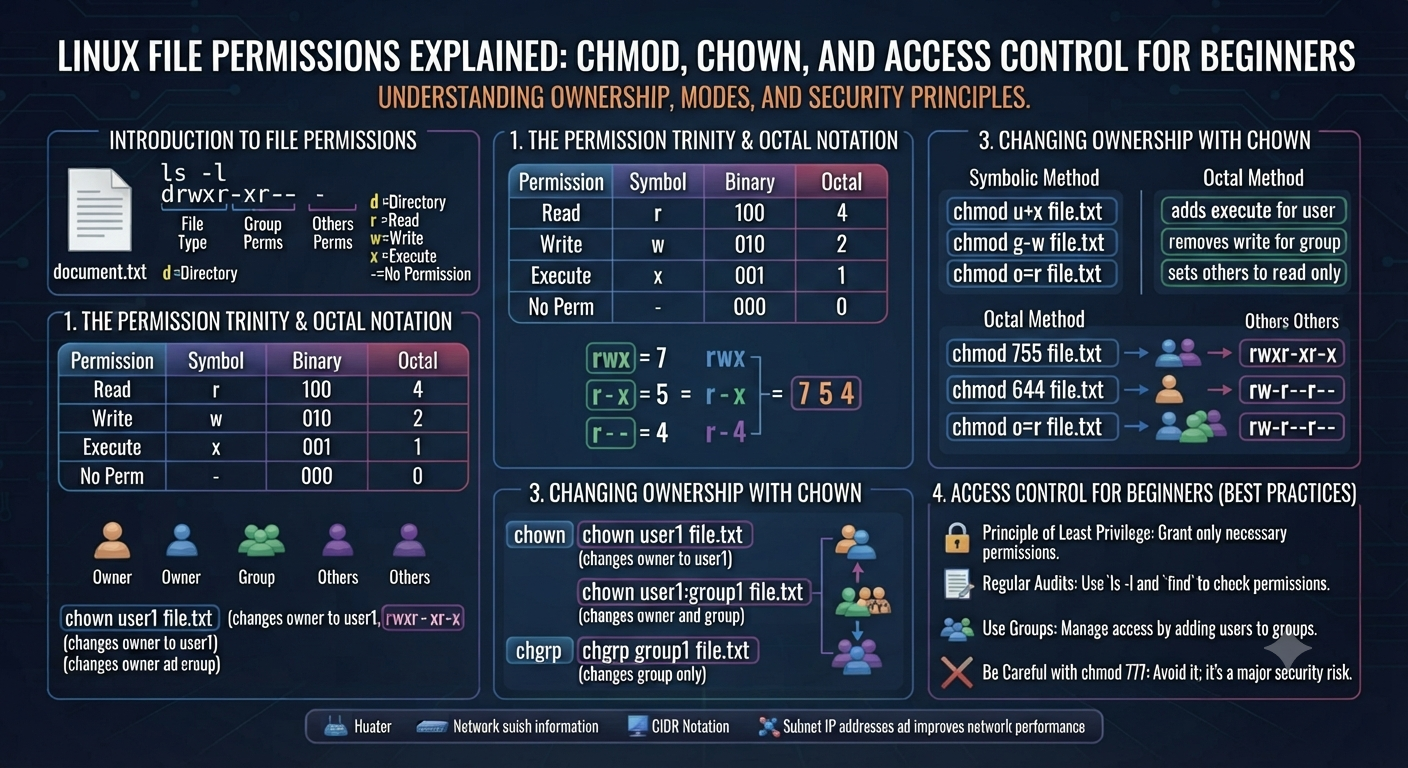
Linux file permissions for dummies: chmod, chown, and access control   You’ve probably typed a command in Linux and gotten the dreaded “Permission denied” message. That’s you meeting Linux file permissions. They’re one of the first real hurdles every new Linux user runs into – and, frankly, one of the most important things to understand if you want to actually use Linux instead of just clicking around it. This guide will take you through Linux file permissions from the ground up – what they are, how to read them, and how to change them using chmod and chown. No jargon dumps. No pretending you know what a superuser is. Just a clear practical explanation you can actually use the next time you open a terminal. What Are File Permissions in Linux? File permissions in Linux are set of rules to set access rights for files and directories. It defines who can read, write or execute. In Linux, every file and directory has an owner and a group associated with it and permissions associated with it. This isn’t an accident – Linux was designed from the ground up as a multi-user OS, which means that multiple people (or multiple processes) can use the same machine without stomping on each other’s files. So when you look at the Linux file permissions of any file, you are really asking three questions: Who is the owner of this file? What can the owner do with it? What can everybody else do with it? Once you learn how to answer those three questions the rest of the system starts to make sense quickly. Linux File Permissions: Why They Matter for Security   This isn’t some technical nicety – Linux file permissions are one of the core building blocks of Linux security. Misconfigured permission allows an attacker to read a password file, overwrite a configuration file, or run a script they should not have access to. On the other hand, too restrictive permissions can break applications and prevent legitimate users from accessing them. This is the exact reason why Linux file permissions keep coming up in system administration, DevOps and cybersecurity work. If you are studying for RHCSA, RHCE or working towards a role in penetration testing, understanding access control is not optional, it’s foundational. This is a topic covered by every hardening checklist, by every audit, by every privilege escalation technique in ethical hacking. Understanding Types of Access Permissions: Read Write Run Linux file permissions are based on three basic permission types: Read (r) — allows you to view the contents of a file, or the contents of a directory. Write (w) permission to change or delete the contents of a file or to add or remove files from a directory. Execute (x) — run a file as a program or script, or enter (“cd” into) a directory. That last point catches a lot of newbies out: execute permission on a directory doesn’t mean “run the folder” – it means you have permission to enter it. You can’t cd into a directory if you don’t have execute permission on it, even if you technically have read permission. We can allow or deny each of the three permission types to three different sets of users. This leads to levels of ownership. Three Permissions Levels: User, Group, and Others In Linux, you assign permissions to each file in three categories: User (u) — the person who owns the file, typically the creator. Group (g) – a set of users having the same access at the group level, usually determined by an administrator. Others (o) – everyone else on the system, not the owner or in the owning group. This three tier structure is what lets Linux file permissions run everything from personal laptops to massive multi-user servers. You can completely control a file, give your team read access, and block everyone else — all with a single permission setting. Reading Permission Strings (ls -l Output) When you run ls -l in a Linux terminal you will see something like this next to each file: -rwxr-xr– 1 jason developers 4096 Jul 20 10:15 deploy.sh The string at the beginning — -rwxr-xr– — is the permission string. Once you understand how to read the permission string, Linux file permissions are easy to understand. Here’s the breakdown. The first character indicates the type of file (- for a normal file, d for a directory, l for a symbolic link) The next three characters (rwx) show the owner’s permissions. The next three (r-x) are the group permissions. The final three (r–) show permissions for others. In this example: the owner (jason) has read, write and execute permissions on the file The group (developers) can read and run it, but they can’t modify it. Everyone else can just read it. That’s a ten character full permission picture – which is exactly why understanding this string is one of the most useful Linux skills you can develop early on. How to Change Linux File Permissions with chmod To actually change file permissions in Linux you use the chmod command, which stands for change mode. It can be used in two common ways: symbolic mode and numeric (octal) mode. Symbolic Form The symbolic mode uses letters to add, remove or set permissions: chmod u+x script.sh # add execute permission for ownerchmod g-w file.txt # remove group write permissionchmod o=r document.txt # set ‘others’ permission to read-onlychmod a+r notes.txt # add read permission to all (everyone) This approach is intuitive in a way, because it is almost plain english: user, group, others or all, plus, minus or equals, plus the permission letter. Octal Mode Numeric mode is faster once you get used to it, and it is the format you will see all the time in tutorials, scripts, and real world documentation. Each permission has a numeric value: Read = 4 Write=2 Execute = 1 You add these values together for each level of ownership. So: chmod 754 script.sh That means: Owner: 7 (4

Advance Cloude Security

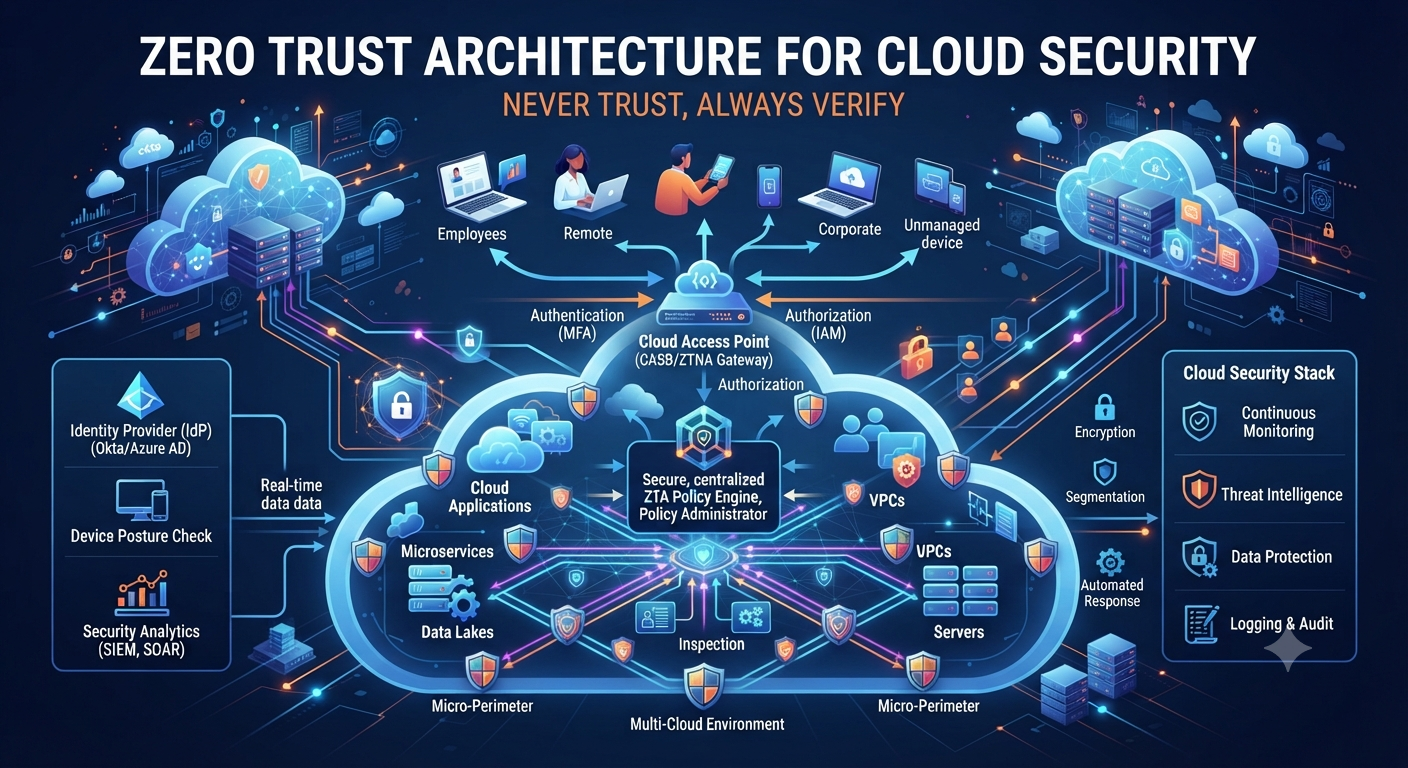
Zero Trust Architecture for Cloud Security

The Definitive Guide to Implementing Zero Trust Architecture for Cloud Security If you’ve done any research into cloud security lately, you’ve probably seen the term Zero Trust Architecture more times than you can count. This is not just a buzzword for security vendors to sell a product. With everything moving to the cloud, it’s becoming standard practice for how companies protect their customers, applications and data. In this guide we will look at what Zero Trust Architecture in cloud security really means, why the old way of cloud security is not working anymore, and how you can implement this zero trust security model step-by-step in your own organization. No BS, no fluff. A clear, practical road map. What is Zero Trust Architecture? A Zero Trust Architecture is a security model based on one simple principle: never trust, always verify. This identity-first model assumes that no one in your network is safe – every user, device and application is a potential threat until it proves otherwise. Traditional security was a castle and a moat. Once inside the walls, you were trusted. This model takes the moat out. All access requests, whether they originate from an employee’s laptop, a contractor’s phone, or an automated script, must be validated before being granted. This is even more important in cloud environments where there is no real perimeter anymore. Your data might be in AWS, your apps in Azure and your team logging in from five different countries. Zero Trust Architecture was built for this distributed, cloud-first world. Cloud Security Models Are Failing Old-school security was based on a clear inside-outside network demarcation. That assumption just isn’t true anymore. Here’s why: The perimeter was broken by remote work. Employees log on from airports, coffee shops and home networks. No wall to protect. Multi-cloud is the new standard. Most companies use more than one cloud provider, so data is in multiple places with different security settings. Machine identities have exploded. In fact, most organizations have more service accounts, APIs and AI agents than they have actual human users and each is a potential entry point. The most common attack method is credential theft. Once inside, no one double checks them. Attackers walk through perimeter defenses with stolen passwords and session tokens. That’s precisely the gap Zero Trust Architecture was designed to fill. It never trusts anything by default and always verifies identity instead of trust based on a location or network. Core Principles of Zero Trust Architecture (ZTA) A solid zero trust framework rests on a few core principles. Knowing these will help you make smarter decisions when you start to implement it. 1. Check explicitly Every access request must be authenticated and authorized using all available data points, such as user identity, device health, location, and behavior patterns. Just because someone successfully logged in last week does not mean they have a free pass. 2. Least Privilege Access Users and applications should be given only the minimum access required to do their job and nothing more. If a marketing person doesn’t need access to financial databases, they shouldn’t have it. Period. 3. Assume a breach This is the mindset shift that makes Zero Trust Architecture so powerful. Your plan is to assume the attacker is already inside, not to hope your defenses work. That means segmenting networks, encrypting data and continuously monitoring for anomalous activity. 4. Micro Segmentation This is in contrast to one large network where one breach in a location compromises everything. This approach slices the environment into small isolated zones. Damage is still limited if only one segment is compromised. 5. Ongoing Monitoring Access is never a one time check. It monitors sessions live and can immediately revoke access if it sees anything dodgy, like a login from an odd place. Deploying Zero Trust Architecture in the Cloud: Step by Step Trying to implement a zero trust security model all in one go can be overwhelming. Don’t do it all at once, do it in manageable bits. Step 1: Map Your Assets and Data Flows You need to know what you actually have before you can protect anything. Identify your cloud applications, sensitive data repositories, and the flow of information between them. If you can’t see it, you can’t get it. Step 2: Enforce Strong Identity Verification Zero Trust Architecture is built on identity. Begin with: Multi-factor authentication (MFA) for all users, no exceptions Single sign-on (SSO) for centralized identity management Conditional access policies based on location and device health Step 3: Enforce least privilege access controls Audit each user, group and service account and remove unneeded permissions. That one step knocks out a big chunk of your attack surface. Step 4: Divide Your Network Micro-segmentation to divide your cloud environment into smaller zones. Keep sensitive workloads away from general traffic, so a breach in one area cannot roam free. Step 5: Encrypt Data Everywhere Encrypt data at rest and in transit. And even if an attacker finds a way around your other defenses, encrypted data is much harder to do anything with. Step 6: Conduct Ongoing Monitoring & Analytics Use tools that monitor user behavior and automatically highlight anomalies. Here, AI-driven monitoring has been especially useful, spotting suspicious patterns faster than ever could be done by manual review. Step 7: Automate response and remediation If something seems wrong, waiting for a human to notice is a waste of precious time. If a threat is detected, automated response systems can lock out accounts, quarantine devices or revoke access. Step 8: Review and Polish Often This is not a “set it and forget it” project. Your business changes, threats evolve, and your policies must be reviewed regularly to be effective. Traditional Security and Zero Trust: Major Variations Factor Traditional Security Zero Trust Architecture Trust model Trust in the network Do not trust anybody by default Access control Broad, network-wide Granular, based on identity Perimeter Defined network boundary Fixed no perimeter Monitoring Constant monitoring Continuous verification Breach containment Often spreads through network Compartmentalized

Advance Cloude Security

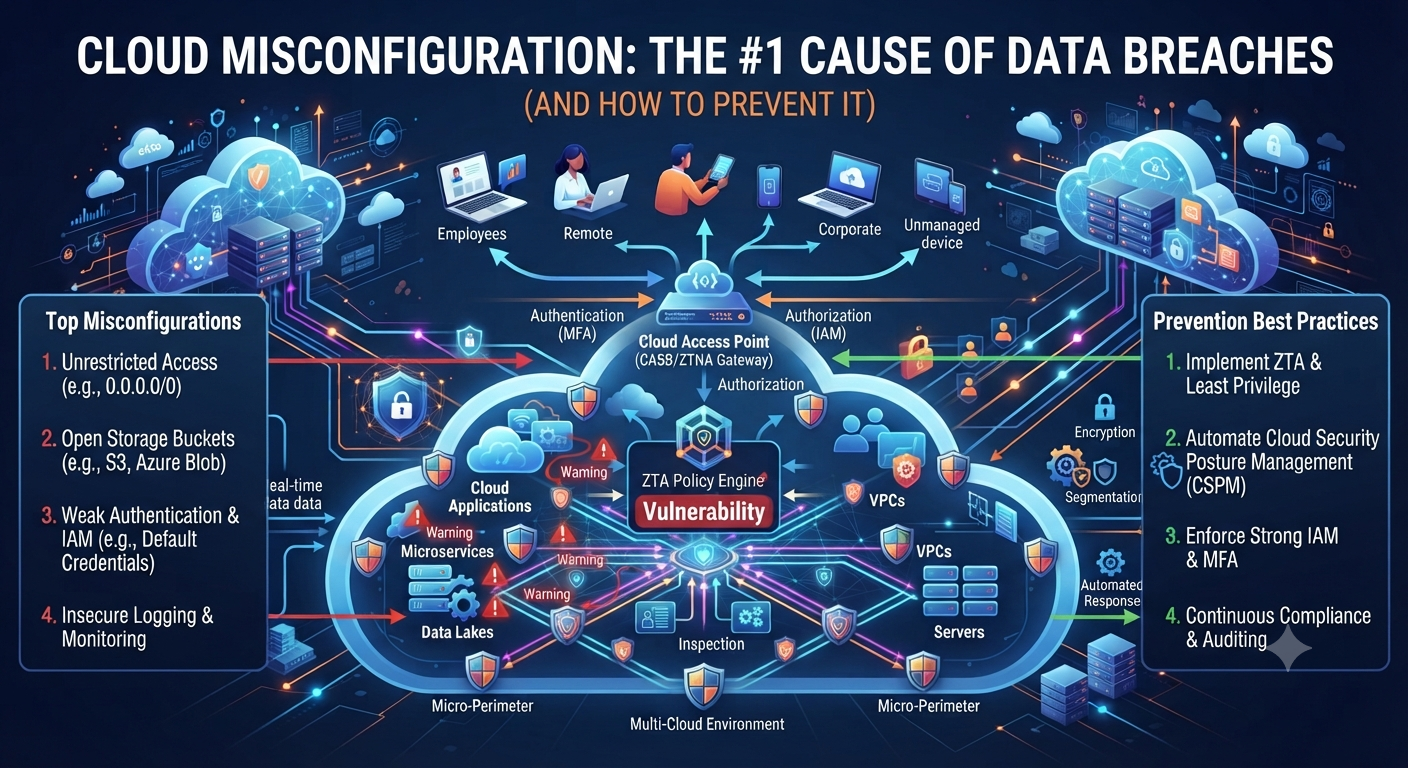
Cloud Misconfiguration: The #1 Cause of Data Breaches (and How to Prevent It)

Cloud Misconfiguration: The #1 Cause of Data Breaches (and How to Stop It)     Ask any security researcher what causes most cloud data breaches and you’ll get the same answer over and over: it’s rarely a genius hacker breaking through advanced defenses. It’s cloud misconfiguration. An open storage bucket. A firewall rule that was never hardened. An unclosed firewall rule. This one mistake is quiet, unglamorous and completely avoidable. Which is exactly why it’s the leading cause of breaches, year after year. In this guide we’ll dissect what this problem actually looks like, why it continues to happen even at well-funded companies, and the specific steps you can take to prevent it before it costs you. What Is Cloud Misconfiguration? Cloud misconfiguration occurs when cloud resources—such as storage buckets, databases, servers, or network settings—are incorrectly configured, exposing them to unauthorized access. The cloud provider’s software is not broken. It’s a mistake in how the person or team has set up their own environment. Think of it this way: you leave your front door open. AWS, Azure and Google Cloud all offer good security tools, but those tools are only effective if configured correctly. This is the sort of gap that can emerge when that configuration step is missed, hurried, or just plain incorrect. Why Cloud Misconfigurations Are the #1 Cause of Data Breaches     It’s tempting to think that breaches happen as a result of sophisticated attacks. The truth is really a lot more simple and, frankly, a little maddening. This is why it keeps topping the list: Cloud environments are always changing. Teams move quickly, new services are created, and permissions are tweaked. Speed will often outrun careful review. The default settings are not necessarily secure. A lot of cloud services are not secure by default, and if you don’t lock them down, they remain open. People get confused about shared responsibility. Cloud providers can secure the infrastructure but customers have to secure what they put in it. This gap is always misunderstood. Multi-cloud makes it worse. It is really hard to keep the same security settings across AWS, Azure and Google Cloud at the same time and small gaps get through. You will make a mistake. Even experienced engineers make mistakes, especially when facing deadlines and forgetting checklists. None of these reasons is exotic. That’s the whole point. Cloud Misconfiguration Is Not Caused by Rare Advanced Threats. It’s the accumulation of everyday oversights. Typical Types of Cloud Misconfiguration   Easier to catch them if you know what the most common mistakes are. Here are the ones security teams see over and over. 1. Publicly Exposed Storage Containers That’s the classic example of a security gap in the cloud. A storage bucket, such as an AWS S3 bucket, is marked “public” instead of “private” and suddenly anyone with the link can view or download sensitive files. 2. Excessively Permissive Access Controls One of the most common types of cloud misconfiguration is giving broad permissions “just to be safe.” If users or applications are given far more access than they need, a single compromised account can lead to the exposure of huge amounts of data. 3. Systems that are not patched or are out of date A great entry point is running outdated software or dependencies within cloud environments. This is the kind of oversight that often goes unnoticed because nothing appears “broken” on the surface. 4. Logging and Monitoring Disabled If logging is off or misconfigured, a breach could go undetected for weeks or months. This mistake isn’t going to directly cause a breach, but it sure makes recovery a whole lot harder. 5. Default or weak credentials One surprisingly common issue is leaving default passwords or API keys unchanged, especially in fast-paced development environments where security is an afterthought. 6. Network settings misconfigured Open ports, missing firewall rules, and overly permissive inbound traffic configuration can all be network configuration errors. These are often the easiest to discover for attackers using automated scanning tools. The Hidden Cost of Cloud Misconfiguration       The fallout from this kind of exposure extends far beyond one leaked file. Depending on how bad it is, it can lead to: Theft of customer data and legal consequences Regulatory fines under laws such as GDPR or HIPAA Reputational damage, which can take years to recover from Direct financial loss due to exposure to fraud or ransomware The loss of customer trust – one of the hardest things to get back That’s why prevention is so much more important than damage control. Once sensitive data is out there you can’t unsend it. How to Avoid Cloud Misconfiguration: One Step at a Time The good news is that cloud misconfiguration is among the most preventable security risks out there. Here’s a practical roadmap. Step 1: Complete a Full Cloud Asset Inventory What does not know you exist can’t be secured. Begin by inventorying all the cloud resources, storage buckets, databases, and services your organization uses across all providers. Step 2: Implement the Principle of Least Privilege Review all user, application and service accounts and remove access they don’t strictly need. This one step removes a huge amount of possible exposure. Step 3: Enable encryption everywhere Default to encrypting data at rest and in transit. Encryption is a key layer of protection, even in case of data exposure due to misconfiguration. Step 4. Automate configuration checks Manual reviews can’t keep up with the speed of change in cloud environments. Use cloud security posture management (CSPM) tools to scan for misconfigurations automatically and flag them in real-time. Step 5: Turn on logging and ongoing monitoring It’s recommended to enable logging for all services and configure notifications for anomalous activity. Early detection can mean the difference between a minor incident or a full-blown breach. Step 6: Standardize Configuration with Templates Use infrastructure-as-code tools to provision resources with approved, secure configurations each time, instead of manual, person-to-person configuration. Step 7: Conduct Regular Security Audits Review your cloud

Advance Cloude Security

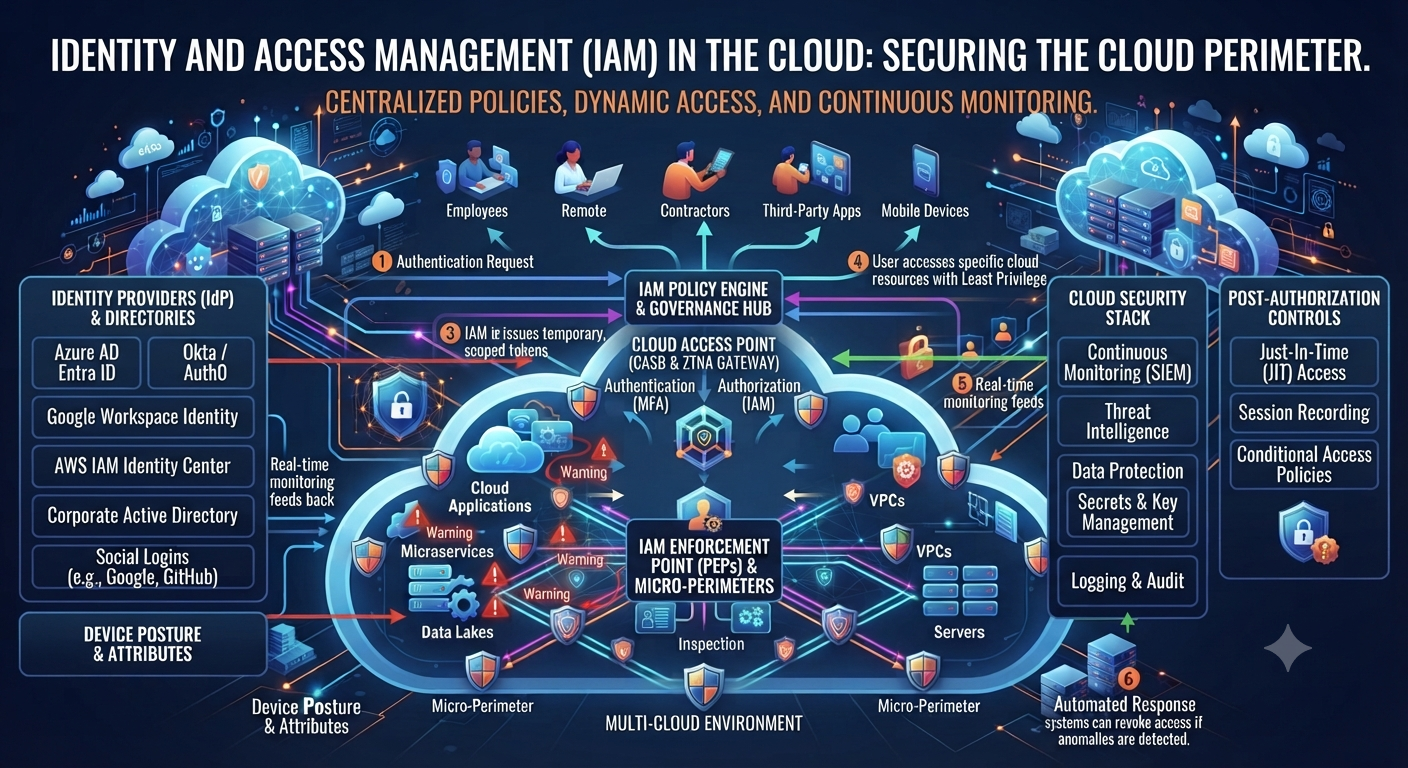
Identity and Access Management in the Cloud

Cloud Identity and Access Management: Securing Human and Non-Human Identities   Image: Digital cloud with identity icons, representing both human and non-human accounts in the cloud. The cloud security conversation for years was about employees: who has the password, who forgot to log out, who clicked the phishing link. That world is over. Most of the “identities” logging into your cloud environment today aren’t people. They are service accounts, APIs, containers, AI agents, and there are many more of them than there are humans on your payroll. And that’s precisely why Identity and Access Management has become the most critical layer of cloud security. In this guide we’ll unpack what this framework actually means, why non-human identities have become such a massive blind spot, and the practical steps you can take to secure both sides of the equation. What Is Identity and Access Management? What is Identity and Access Management (IAM)? Identity and Access Management, also known as IAM, is the collection of policies and technology that controls who or what can access your cloud resources and what they can do with them. Every time you log in, make an API call, run an automated script against your cloud environment, you’re passing through some version of this framework whether you realize it or not. At the core of this discipline is the answering of two questions for each and every request: who are you and what are you allowed to do? Get either of them wrong and you’ve opened a door that should never have been opened. Why Identity and Access Management is More Important Than Ever The cloud used to be relatively easy to secure because there were fewer moving parts. That is no longer the case and IAM strategy has had to evolve quickly to keep up. Explosion of machine identities. Most cloud environments today have many more service accounts, APIs and automated workflows than human users. AI agents are a whole new category. These systems usually need broad access to do their job and, thus, are an attractive target if left unmanaged. Remote and hybrid work eliminated the perimeter. As people log in from personal devices, home networks and shared spaces, identity has become the real security boundary. Multi-cloud creates a lot more complexity. Trying to manage a consistent access policy across AWS, Azure and Google Cloud at the same time is actually hard without a strong Identity and Access Management strategy. Credential theft is still the primary attack vector. “Once they have stolen or leaked credentials, they can walk through the front door. That’s exactly what strong identity controls are designed to prevent.” Human vs Non-Human Identities: What’s the Difference? Most people think of identity only as employees logging in. The truth is that modern Identity and Access Management has two very different categories to consider. Human Identity These are your employees, contractors and partners. They log in with user names and passwords and more and more with multi-factor authentication. Needs for access are usually fairly predictable and related to a particular role or department. Non-Human Identifiers These include service accounts, API keys, bots, containers, microservices, and even AI agents. Unlike humans, these identities often run continuously, operate at machine speed and have standing privileges that are never reviewed. Most organizations now have far more machine identities than human employees and that gap is growing every year. The problem is that many security teams still build their Identity and Access Management strategy around humans first, leaving non-human identities under-monitored and over-privileged. Cloud Identity Security Core Principles Whether the identities are human or non-human, there are a few foundational principles that are the basis of a strong identity governance program. Minimum Privilege Access Every identity, machine or human, should have the least amount of access necessary to do its job. Nothing else. Continuous Validation Access must never be a one-off check. It’s important to continuously check sessions and permissions for things like non-human identities that are operating 24/7. Scalable Identity Governance Every identity, whether it’s an employee or an automated script, should be tracked in one system, not in different tools. Top Level Authentication This principle uses multi-factor authentication for people, and short-lived, automatically rotated credentials for machines. Perform Periodic Access Reviews Permissions drift over time . Regular reviews of accounts will catch those with more access than they should have, human or otherwise. How to Implement Identity and Access Management in Cloud: 2 step by step A robust access control strategy can be put in place in time. Break it down into doable, clear steps. Step 1: Make a List of All Identities Begin with a catalog of all human users and all non-human identities in your cloud environment, including forgotten service accounts and orphaned API keys. Step 2: Enforce least privilege everywhere Check each identity and remove any excess permissions. Just this alone takes a big chunk out of your attack surface. Step 3: Bring identity management in-house Manage permissions from a single Identity and Access Management platform instead of managing permissions separately for AWS, Azure, and Google Cloud. Step 4: Implement Strong Authentication Require multi-factor authentication for all human users, and use short-lived, automatically rotated credentials for machine identities instead of static API keys. Step 5: Watch out for Non-Human Identities Treat service accounts and AI agents the same way you would treat human users. Watch what they do, notice anything strange, and lay down the law about what they can and cannot get into. Step 6: Automate Access Reviews Manual reviews can’t keep up with the speed of change in cloud environments. Automated tools can constantly flag excessive permissions and inactive accounts. Step 7: Configure Access Expiration Temporary access should really expire. One of the biggest risks in any identity governance program is one-time standing privileges that are never revisited. Step 8: Develop Your Team Even the best access management tools are worthless if the employees don’t understand the importance of access controls and how to comply. Identity & Access Management Risks