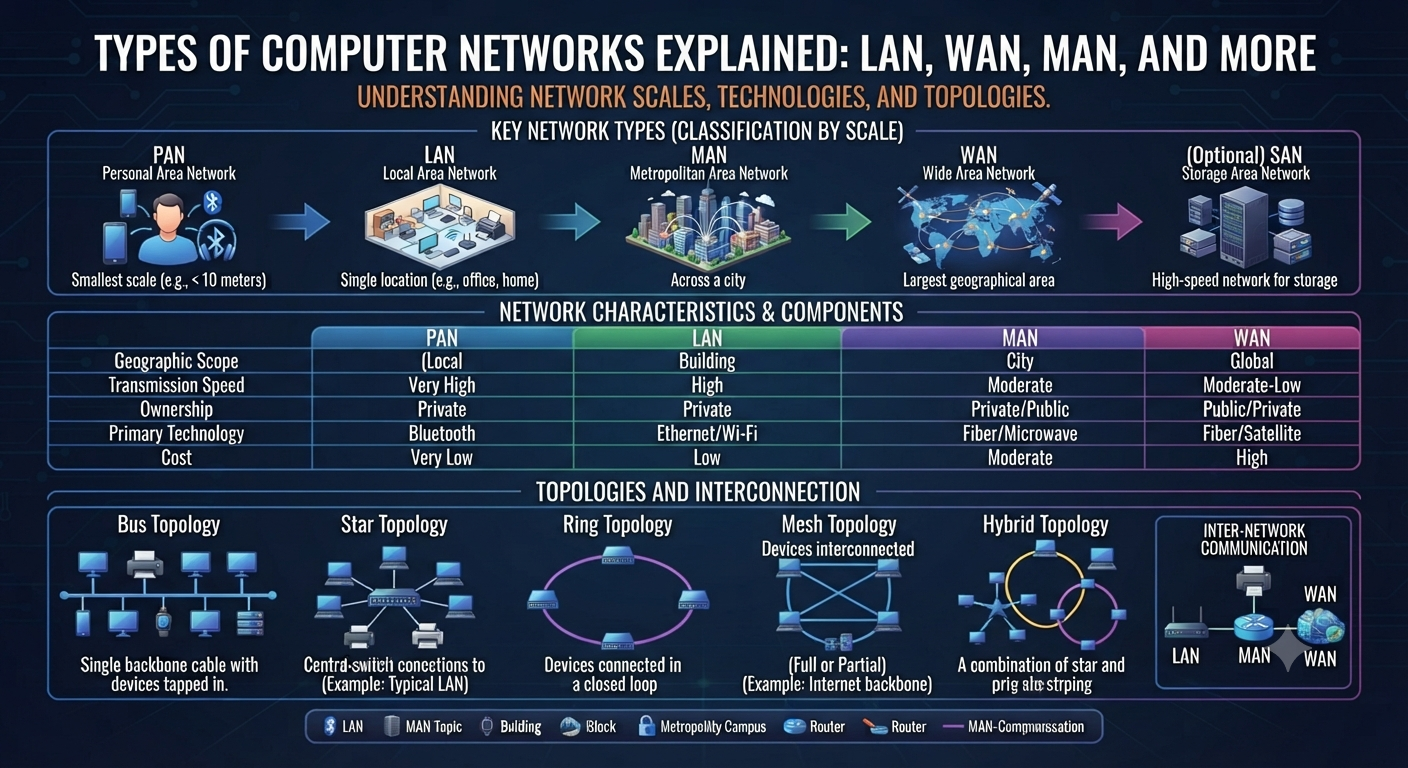
Computer Network Types LAN, WAN, MAN & Others Demystified If you are studying IT, preparing for a CCNA exam or just trying to understand how the internet actually connects your laptop to a server half way across the world, you have probably heard the term “network” a hundred times without a clear picture of what it means. This guide simplifies the major types of computer networks and explains them in plain language so that you walk away knowing exactly what a LAN, WAN, MAN and a few other network types are – and when each one is actually used. What is a network computer? A computer network is simply a group of two or more devices – computers, servers, printers, phones – that are interconnected so they can share data and resources. The connection can be a physical cable or a wireless signal, and it can be between one room or an entire continent. There are many different types of computer networks because “connecting devices” can mean very different things depending on the distance involved, the number of users, and the purpose. Both a home Wi-Fi setup and the network that runs a bank’s ATM system are networks, but they are built and maintained in very different ways. Why Knowing the Different Types of Computer Networks is Important Knowing about the different types of computer networks isn’t just exam trivia — it’s the foundation of nearly every IT career path, from network administration to cybersecurity to cloud engineering. Certifications such as CCNA and CCNP directly test this knowledge, as every troubleshooting decision, every security policy, and every infrastructure design starts with knowing what kind of network you have. Main Types of Computer Networks Geographic size is the easiest way to understand the different types of computer networks, and computer networks are usually classified by geographic size. This is what you will most often see, from smallest to largest. Local Area Network (LAN) A LAN is a network confined to a small physical space such as a single office, a home, a school lab, or one floor of a building. This is the most common of all the types of computer networks, as almost every home and business has one. A LAN is a network owned and operated by one company or person, and it typically uses Wi-Fi or Ethernet connections. Because the devices are close together, such as sharing files between office computers or connecting to a local printer, LANs have very high speed and low latency. To set up a network you will typically need a router, a switch, and network cabling or a wireless access point. WAN Wide Area Network A WAN connects devices over large geographical areas such as cities, countries, or continents. The biggest example of this type of network is the internet itself, but private companies also build their own wide area networks (WANs) to connect branch offices in different locations. Unlike a LAN, a WAN typically uses third-party infrastructure such as leased telecom lines, satellite links, or fiber-optic backbones since no single organization owns the cables stretching across entire countries. Speed and latency vary greatly depending on the type of connection. WANs also require more complex routing, security and management than a LAN. Of all computer network types, WANs are the type that enables remote work and worldwide business operations. MAN (Metropolitan Area Network) A MAN is somewhere in between a LAN and a WAN – it covers a city or a large campus, interconnecting multiple LANs in that area. City governments, multi-campus universities, and cable TV providers often use MANs to connect buildings without relying on the entire public internet. MANs are usually owned by one organization or an Internet service provider that provides metropolitan coverage. MANs use high speed fiber optic connections. It is not a very known member of the family of network types, but it has an important role in the urban infrastructure. PAN (Personal Area Network) PANs are the smallest network, centering on a single person’s immediate devices — say, a phone and wireless earbuds, a smartwatch or a laptop connected over Bluetooth. Its range is usually only a few meters. Most modern scenarios have PANs that are wireless by default and is used all the time without people knowing that it is technically a network. CAN (Campus Area Network) A CAN links together many LANs over a small geographical area, such as a university or corporate campus, but not across a city like a MAN. It’s basically a bridge between LAN scale and MAN scale. It’s common for educational institutions where several buildings need to share resources like a central server or library database. SAN (Storage Area Network) * A SAN is a high-speed, special-purpose network that connects servers to storage devices that is independent of the normal data network. SANs are used by businesses for centrally storing data, backups and disaster recovery because they deliver fast access to data at the block level without slowing down the main network. WLAN (Wireless Local Area Networking) A WLAN is just a LAN that connects devices using wireless technology (Wi-Fi) instead of physical cables. The convenience of not having to run cables to each device has made the setup the default in homes, cafes and offices, although it usually sacrifices a bit of speed and security compared to a wired LAN. Difference Between LAN and WAN and MAN Feature LAN MAN WAN Coverage area Single building/room City-wide Country/global Ownership One organization Single entity and/or ISP Several providers Speed Very fast Fast Varies (often slower) Setup cost Low Medium High Example Office network City gov network The net Seeing these three types of networks together makes it easier to understand why organizations use different types of networks depending on how far their data needs to travel. Computer Network Types by Architecture Besides geographical classification, network types can also be classified by the way devices communicate with each other: Client-Server Network: Clients request resources from